6.190 MIT Course Notes
What is information?
- Bits of information
- 1 bit = 1 yes/no information
-
- = number of bits
- = number of information things you can specify/represent
- If you have 8 bits: can represent/specify 256 things
- Is a "thing" capable of specifying one of 2341 options? That thing contains bits of information
Representing information
- 2 primary entities in electronics: voltage and current
- Most info in modern EECS is expressed in voltage, although current plays an important role too
Analog system: voltage can be expressed and interpreted as many values. Digital system: voltage is limited (almost always to 2 categories of values)
- Analog vs. digital:
- Analog - 0 vs 10V (can have manyyyyy encoded bits with one value) - shades of gray!
- Digital - 0 vs. 1 bit - black and white
- 💡 On paper, the ideal case is evidently analog, because a voltage varying from 0 to 10V in 0.01V steps means a single reading can contain up to 1000 options or approx 9.96 bits of info
- But not noise robust! Variance in 0.01V measurement will mess the whole thing up.
- 🔑 Digital solution is robust! either has signal or 0
- Digital conveys less information in one bit, but way more robust than analog
Digital in electronics (digital contract)
- Use voltages to represent the yes/no 1/0:
- High voltage: 1
- Low voltage 0:
- Specifically we set up a "contract" which all parts agree to:
- Above a certain amount is 1, below a certain amount is 0, in the middle between these is the forbidden zone (to prevent us from even having to worry about weird noisy flips in the middle)
Information budget
- How many bits needed to represent hour of day?
- 24 options: = 5 bits
Binary
- Smallest number: , largest number:
- Binary addition, subtraction, multiplication, division are all performed as they are in base 10
- Overflow: if we use a fixed number of bits, addition a nnd other ops can produce results outside the range that the output can represent
- Underflow: ^ same idea but w subtraction (negative numbers in lec 2)
- 💡 Limiting output to bits is the same as mod
- overflow and underflow can be helpful ^ !
Decimal to binary
- Find the largest power of 2 that will fit into the decimal number, e.g. for 21, we would have
- Subtract 21 - 16 = 5
- Check , doesn't fit, check , fits
- Subtract 5 - 4 = 1
- Check , doesn't fit, check , fits
- Subtract 1 - 1 = 0 → Done!
Answer: 0b10101
C programming language
- Been around for 50 years
- Very low-level compared to Python
- Very unsafe language compared to Python
- Original C textbook is very good, masterpiece of technical literature
- Python is written in C!
- Need to declare types!
Printing
- Specifying width:
printf("%3d, %6d\n", a, b)awill be given 3 columns of space,bwill be given 6 columns
- Printing floating space:
%f %d: decimal number
Types
- 3 main types:
- integers:
int, 4 bytes - characters:
char, 1 byte- 1 byte = 8 bits → standard ASCII has only characters so 1 byte suffices!
- floating point numbers:
float, 4 bytes
- integers:
- ⚠️ Cannot change a variable's type post creation!
goto (not in Python)
- C allows you to jump to labeled locations in your code using the
gotostatement - very close to how assembly works!
Operators
- Logical and bitwise!
- Shift operations
- Shift left by
iis same as multiply by as long as don't fall off edge- think:
24→240in base 10 is multiply by → same idea for base 2
- think:
- Shift right by
iis same as integer divide by (floor)- think:
24→2=24//10(integer divide)
- think:
- Shift left by
Pointer
- Pointer is a data type in C that "points" to other data
- It does so by storing a memory address (called a reference)
- We can then access what it points to as needed (dereference)
- Allows direct access and manipulation of memory (dangerous, but also freeing)
int x = 5; // make int called x
int * ptr_to_x; // make int pointer called ptr_to_x
ptr_to_x = &x; // give ptr_to_x the address of x
int * ptr_to_x;declares thatptr_to_xis a pointer to an integer- 📍 Pointer is itself a variable! It also lives in memory and has its own address. Except its value is the address of integer
x's spot in memory. *is used in conjunction with type to declare a pointer*is also used to dereference = get the value at the address the pointer points to
int * z; // declare int pointer named z
*z = a; // set the value z points to to be int a
b = *z; // set int b to be the value z points to
int *z = &a; // set pointer z's value to a's address
- 💡 As operators,
*and&are opposites and can cancel out:
int x = 5; // create x and set to 5
x = 6; // set x to 6
*(&x) = 6; // same thing as line above
*(&x) = 6→ "the value located at the address ofxis 6"- 🔑 The purpose/utility of pointers:
- To point to a variable
- To refer to memory regions that aren't associated with variables
- MMIO - read directly from fixed spots in memory
- To point to a group/region of data/variables
- Large groups of data can be slow to copy around - if we can instead just hand around a pointer to the data group, can be much faster!
Larger data types in C
- Arrays
int a[6] = {3, 9, 6, 1, 7, 2};
- ⚠️ Need to know array length explicitly in C! Unlike python
- Size must be known at init + fixed
- Type of all elements of the array must be the same (can't have mix of ints and chars and floats)
- Variable
astores the address to the first element in array *(a+3)= 4th element ofa(index 3)
Array is an ordered list of contents in memory - there is no attribute
lenetc.
- Structs
What is memory?
- Memory is a large chunk of electrical storage
- Everything is stored in binary
- Every part of memory has an address affiliated with it
- Goes from low addresses to high addresses
- If you were to "look" at memory - you'd just see a massive sea of
1's and0's going on for ages
Hexadecimal
- Base 16!
0000 - 0
0001 - 1
0010 - 2
0011 - 3
0100 - 4
0101 - 5
0110 - 6
0111 - 7
1000 - 8
1001 - 9
1010 - A
1011 - B
1100 - C
1101 - D
1110 - E
1111 - F
- We use hex and binary interchangeably (they are the exact same thing to the computer)! Except hex is easier for us humans to read when the binary strings get long.
Organization - bytes & words
Smallest unit accessible in memory of most modern computers is a byte which is 8 bits.
- In 6.190, we operate in a 32 bit system which means the memory is organized into 4-byte words
- In memory, we have:
- 4-byte words with addresses
- Each word contains 32 bits of data
- Addresses are also 32 bits of data
Recitation 1
- Unsigned binary operations
- Addition (add digit-wise, carry over when 1+1)
- Multiplication (multiply digit-wise, add partial products)
- How would you get the memory address of a value stored in a variable x?
&x - A pointer is a memory address
- (Read up on what a pointer is more - is it an address? points to an address? What is it?)
- If a variable
zstores the address of the number value 10, how would you get that value 10 fromz?*z*z= go to addresszand get that value- e.g:
int x = 10;
int *z = &x
Lab 1: Introduction
- ESP32: Espressif ESP32-C3-DevKitM-1
- RISC-V microprocessor
- PCB
5.2) Starter code
- C header file:
6190.h - PlatformIO project config file:
platformio.ini
6) General purpose input/output (GPIO)
- GPIO pins:
- Before usage, must configure them by writing values to specific memory addresses (aka. control registers) on the ESP32
- 32-bit values
6.1) Bit manipulation
- 3 main operations:
- Setting one bit in the -bit value so that the bit is equal to 1 (w/o modifying any of the other bits in the value)
- To set bit
x(zero-indexing from the rightmost bit) to be 1:val |= (1 << x);
- To set bit
- Clearing one bit in the -bit value so that the bit is equal to 0 (w/o modifying any of the other bits in the value)
- To clear bit
x(zero-indexing from the rightmost bit) to be 0:val &= ~(1 << 2);
- To clear bit
- Reading one bit from the -bit value (without modifying the value itself)
- To read
xth bit:bit = (val >> x) & 1;
- To read
- Setting one bit in the -bit value so that the bit is equal to 1 (w/o modifying any of the other bits in the value)
- 📍 Rightmost "least-significant" bit is the 0th bit
6.2) GPIO configuration
- Given a memory address, e.g.
GPIO_ENABLE_ADRR, to access the value at this memory address:
int *gpio_enable_addr = (int*) GPIO_ENABLE_ADDR; // declare pointer equal to this memory address
int gpio_enable_val = *gpio_enable_addr; // puts 32-bit value stored at GPIO_ENABLE_ADDR into variable gpio_enable_val
*gpio_enable_addr = 500; // writes the 32-bit number 500 to memory address GPIO_ENABLE_ADDR
7) Logical LEDs
- Questions:
- Why is 0 = button pressed?
Exercise 1
Some C Practice
enum= "creating a type" with a meaningful name- enums don't make your code more efficient but they make your code more readable
enum location {Below=-1, Within=0, Above=1};
# then a valid function that returns type location would be:
location boundary_function(...) {
	return Within;
}
- Review how to code binary search, e.g.:
long abs(long n) {
    if (n >= 0) {
        return n;
    } else { return -1 * n; }
}

long cube(int n) {
    return (long)n * n * n;
}

int cube_root(int value){
    // Binary search from 1 to value
    if (value == 1) { return 1; }
    int low = 1;
    int high = value / 2;
    long best_dist_so_far = -1;
    int best_so_far;
    while (low <= high) {
        int mid = (low + high) / 2;
        long mid_cubed = cube(mid);
        long new_dist = abs(mid_cubed - value);
        if (best_dist_so_far == -1 || new_dist < best_dist_so_far) {
            best_dist_so_far = new_dist;
            best_so_far = mid;
        }
        // Binary search update
        if (mid_cubed < value) {
            low = mid + 1;
        } else {
            high = mid - 1; // Why mid - 1 and not mid?
        }
    }
    return best_so_far;
}
- Review how to code a merge sort
Lecture 2
- bits - can represent different things
- 1byte = 8bits
- how many bits needed to represent possibilities? bits
- 💡 an 8-bit value represents unique things but there are many types of things we need to represent - not necessarily a number
- 163 if unsigned int
- -93 if signed integer
- ... if float
- ... etc!
Lec outline
- Addresses
- Pointers
- Arrays
- Pointer arithmetic
- C-strings (a little bit)
- Characters
- ASCII
- Unicode
- Numbers
- Ints
- Signed ints
- Decimals, etc.
- Booleans
Recap: Computer organization
The smallest unit accessible in memory of most modern computers is a byte which is 8 bits.
- Computer memory:
- 4-byte words with addresses
- Each word contains 32 bits of data
- Consecutive words have addresses that are 4 bytes apart
- this doesn't mean you can't go to address that is 1 byte apart - it just won't be the next consecutive word
- 32-bit machine: addresses are 32 bits; 64-bit machine: addresses are 64 bits
- 32-bit machine: different addresses available
- each address points to 1 byte, so bytes of addressable memory
- bytes = words
An address is like a label/location in memory. At that location, the computer can store bits. How you interpret those bits depends on your program: they could represent an
int, achar, an instruction, part of an array, part of a pointer, etc.
- 📍 Pointers must have size (like any other variable)! To hold the address of an arbitrary spot in memory for 32-bit machines, pointer has size = 32 bits
Size of different data types
- 1 byte:
char,uint8_t,int8_t - 2 bytes:
uint16_t,int16_t - 4 bytes:
uint32_t,int32_t,float - pointers also have type! we need to know what size of thing to pull from the address
int *ptr_x;= pointerptr_xof typeint- can also write
int * ptr_x,int* ptr_x, butint *ptr_xis probably closest to the true meaning saying "*ptr_x" is of type integer
- can also write
Pointers will break if the types are wrong
char c = 'J';
char *ptr_c = &c;
int *ptr_d = &c;
printf("ptrc_c points to %c, ptr_d points to %d\n", *ptr_c, *ptr_d);
// prints: ptr_c points to J, ptr_d points to 525944906
- ⚠️ above code will lead to interpreting the contents at
&cas an int - a char is not an int ... their encoding and sizes are different! so decoding char as an int (what we do when we dereference*ptr_d) causes problems - 💡 A pointer itself is a variable, which lives in memory - which means it can be pointed to as well → we call that a pointer pointer
Arrays
- Creating an array does 2 things:
- Allocates memory for the array
- Creates a pointer by which you access that spot in memory
- 💡 An array is basically a pointer + specially allocated memory!
- Dereferencing with an offset is identical to indexing!
y[3] == *(y+3) - ⚠️ Watch your limits! Arrays exist in memory, and there are no boundary checks in C!
- ⚠️ Slight difference between array variable and pointer: array's pointer is the only way to access the memory that makes up the array so be careful!
int a = 1;
int *x = &a;
int y[10] = {1,2,3,4,5}
// x and y are of the same type! int poitners! (sort of)
y = &a; // not allowed will throw compile error
- ^ this protects you from losing access to your memory location!
- ⚠️ an array cannot be reassigned!
- once an array exists, you can't reassign it! the value of an array is an address!!! an array is a fixed pointer.
- however, you can reassign the things in the array
- ⚠️ the information about how large an array is needs to get passed into functions separately - all the function sees is a pointer!
Arrays devolve to pointers inside functions.
- e.g. ^ need to write:
void double_every_entry_better(int *ptr, int length) {
	for (int i = 0; i < length; i++) {
		*(ptr + i) = *(ptr + i) * 2;
	}
}// length param is called *metadata*
Strings
Strings are arrays of
chars. They have a special characterNULLto mark the end of a string so that we don't have to repeatedly hand around second arguments with the strings saying how long it is.
Characters
ASCII: Represent original computer characters using 8 bits: 256 possibilities (though only lower 128 are used)
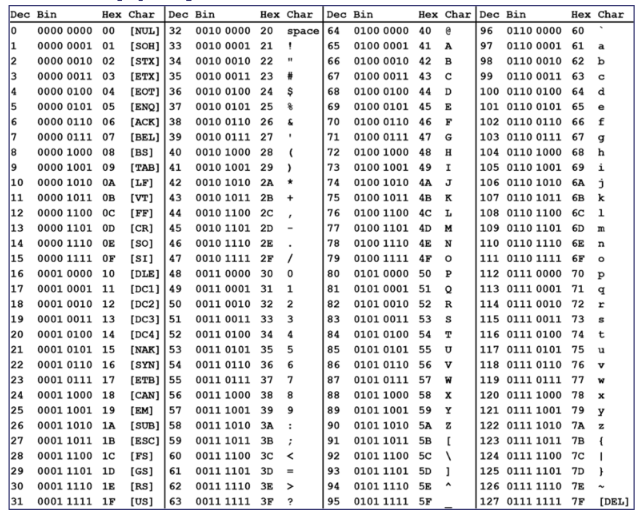
0b00000000isNULL- Another form of
ASCIItable (same as one above but with nicer colors):
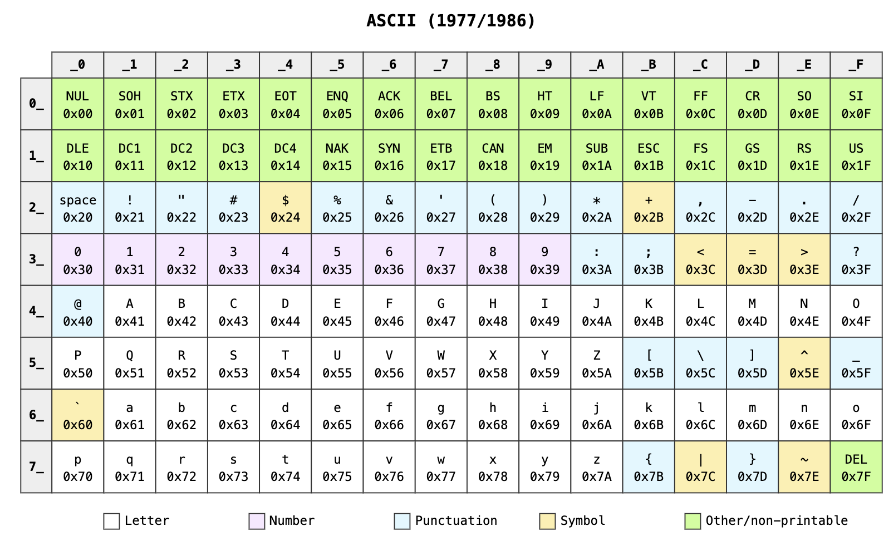
- The char encoding is separate from the render - e.g. rendering
Ais a query to a lookup table - Other character encodings:
- Unicode - more languages, symbols, etc. - 4 byte representation!
- ASCII still kept at 1 byte
Boolean
- Original C doesn't really have a "bool" type
- A boolean only needs 1 bit to express itself
- In general an unsigned int is used s.t. 0 is
false, and everything else istrue.
Numbers
- Unsigned ints
uints:uint8_t- 1 byteuint16_t- 2 bytesuint32_t- 4 bytes- Inherent modularity when you use a fixed number of bits
- overflow
- Signed ints
- Two's complement: use inherent modularity of fixed bit unsigned addition to encode negative numbers
- The negative of a number can be expressed as (for 3-bit numbers): generally,
- Remember this!!
- How many values can we encode with 3 bits now? -4 to 3 (only one 0!) → distinct values!
int8_t: 1 byte: valuesint16_t: 2 bytes: valuesint32_t: 4bytes: values
Two's complement
- Negative numbers have
1in the high-order bit - Most negative number:
10...0= - Most positive number:
01...1= - If all bits are 1:
Extending digits
- In unsigned int, if you want to make it take more bits, just add 0s to the front
- In signed int, you need to sign extend
Shift left
- Add 0s to the right, drop of MSB
- Always "logical"
Shift right
- Logical: Pad 0s
- Arithmetic: Sign extend
Why still have unsigned ints?
uint8_tandint8_tboth represent 256 things, but:uint8_t: 0 to +255int8_t: -128 to +127
- 💡 If I know my loop has to iterate from 0 to 140 (or if I'm working with array indices etc.) it would be a waste to have to use 16 bits because I have to use only signed integers.
uint8_tis a better choice for some things so we keep them around!
Decimals
- One attempt: fixed point representation
- Instead, we actually use: floating point!
- An exponential format
- 💡 Thought experiment to motivate the ideas behind floating point:
- Imagine we have an (totally nonexistent lol) 8-bit type called
exp8_twhere the 8 bits represent an exponent: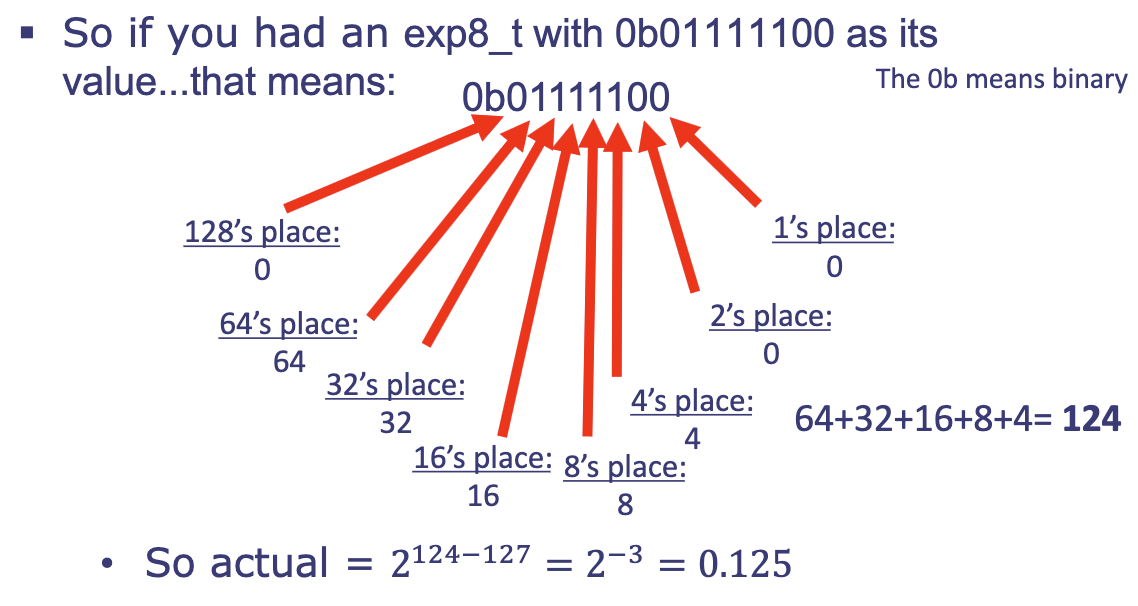
- ^ this would allow us to encode a massive range of numbers with decimal points but the precisions of the numbers would be limited (only really one number for each order of magnitude)
- 🔑 We can increase precision by adding more bits! → IEEE754 floating point representation
- Imagine we have an (totally nonexistent lol) 8-bit type called
IEEE754 Floating point
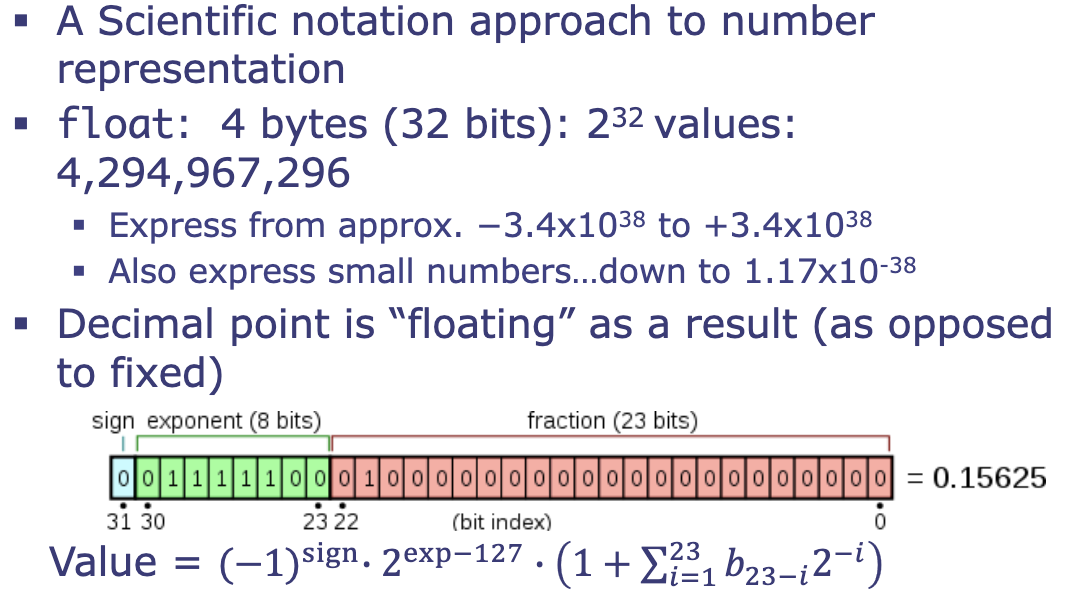
- ^ 24 bit fixed-point number (23 bits of which are specifiable)
- e.g., mantissa in the image =
Exercise 2
Two's complement
- What's the smallest number of bits needed to properly represent the result of
0b0010 - 0b0100?- (0b0100) = 0b1011 + 1 = 11000b0010 + 0b1100 = 0b1110 = -8+4+2 = -2 = 0b10→ 2 bits is sufficient!
- Arithmetic vs. logical right shift:
- Arithmetic: left append MSB-matching bits (0s or 1s)
- Logical: left append 0 bits only
Floating point
- 32-bit floating point to decimal:
- (1 sign bit) (8 bits exponent) (23 bits fraction)
- Sign bit = 0: positive; sign bit = 1: negative →
- Exponent: ( assuming the IEEE bias is 127)
- i.e., convert the 8 bits to decimal, subtract 127, then raise 2 to the power of this
- Fraction (mantissa): 1.[23 bit fraction] (e.g.,
01001should be interpreted as1.{01001}in decimal)- The
{01001}should be converted via: (left)2^-1 | 2^-2 | 2^-3 | ...(right)- i.e.,
- The
- Final decimal number:
(-1)^sign * mantissa * 2^exponent - e.g.:
0b1011_1110_1010_0000_0000_0000_0000_0000- Sign bit: 1
- Exponent:
01111101= 125 - 127 → - Fraction:
1.{01000000000000000000000}= 1.25 - Combined:
- (1 sign bit) (8 bits exponent) (23 bits fraction)
- Decimal to 32-bit floating point:
- e.g: -10
- Sign bit: 1 (negative)
- Convert 10 → binary:
1010 - Scientific notation in base 2:
1010 → 1.010 * 2^3(this is essentially ) - Exponent:
- Drop leading 1, pad to 23 bits for mantissa:
01000000000...
- e.g: 0.875
- Sign bit: 0 (positive)
- Convert 0.875 → binary: fraction method of binary conversion! Multiply by 2 repeatedly:
- 0.875 * 2 = 1.75 →
1 - 0.75 * 2 = 1.5 →
1 - 0.5 * 2 = 1 →
1 - 0 * 2 = 0 →
0 - Total:
0.1110
- 0.875 * 2 = 1.75 →
- Normalize (scientific notation):
0.1110→1.110 * 2^{-1} - Exponent:
- Drop leading 1, pad to 23 bits for mantissa:
1100000... - Assemble:
0_01111110_1100_0000_0000_0000_0000_000
- e.g: -10
- 💡 How to figure out if a decimal can be represented exactly in binary (IEEE 754)?
A number can be represented exactly in binary iff its reduced fraction has denominator = , aka. only fractions whose denominator is a power of 2 will terminate in binary.
- e.g: can be represented in 32-bit floating point binary
- cannot be represented in 32-bit floating point binary, because its most reduced form (i.e. itself, 1/15) has denominator .
- cannot be represented in 32-bit floating point binary, because its most reduced form has denominator .
- 📍 Floating point logical comparisons abide by normal logic (positive > negative, larger number > smaller number, etc.)
Mixed width inputs
a = 0b01001;
b = 0b011;
unsigned result = a + b;
result = 0b?

01001
00011 // extend 0s because we are doing unsigned addition
-----
01100
Another example:
a = 0b1010;
b = 0b00011;
signed result = a + b;

11010 // extend most significant bit for signed operations
00011
-----
11101
And another one:
a = 0b11011;
b = 0b1001;
signed result = a - b;

11011 // extend MSB
00111 // negated 1001 + extend MSB
-----
100010 // keep 5 least significant dig - 00010
result = 0b00010
And another one:
a = 0b01011;
b = 0b0110;
signed result = a + b;

01011
00110 // extend MSB
-----
10001 // overflow! redo with more padding

001011
000110
------
010001 // yay looks good! no more overflow
result = 0b010001
- 💡 Summary of steps: (assuming that each time we encounter overflow, we pad to fix it)
a + b- Match widths to :
- Unsigned: prepend
0's to the shorter operand - Signed: replicate the MSB (most significant bit) of the shorter operand
- Unsigned: prepend
- For subtraction, convert to addition:
a - b = a + (-b)-b= flip bits + add 1
- Perform addition, keep rightmost bits
- Check for overflow:
- Unsigned: was there a carry out of the MSB?
- Signed: did two same-sign inputs produce an opposite-sign result?
- 📍 Mixed sign addition (one negative, one positive) can never overflow - will always end up at a number less "extreme" (closer to 0) than
aorb
- If overflow, redo with bits (extend both operands by 1 bit - 0 or sign extend depending on unsigned/signed), then repeat from step 3.
- Match widths to :
C++ operator precedence
https://en.cppreference.com/w/cpp/language/operator_precedence.html
- Important order to remember:
a++, a--, type(a), a[]++a, --a,*a, &a,!a, ~a, (type)aa * b, a / b, a % ba + b, a - ba << b, a >> ba < b, a <= b, a > b, a >= ba == b, a != ba & ba ^ ba | ba && ba || ba = b, a ? b : c,a += b,a *= b, ...
e.g:
int b = 8 ^ 5 & 9 | 3;
5 & 9 = 0101 & 1001 = 00011000 ^ 0001 = 10011001 | 0011 = 10111011= 11
int c = !0 && 1 || 5 || 3 && 0;
!0= 11 && 0 = 0,3 && 0 = 00 || 5 || 0 = 1
int d = 2 + 3 << 4 / 2 == 7 ^ 5 * 2 | 4;
5 * 2 = 10,4 / 2 = 22 + 3 = 55 << 2 = 0101 << 2 = 010100010100 == 7= False = 00 ^ 10 = 0000 ^ 1010 = 10101010 | 0100 = 1110= 14
int a = 2;
int b = a++ + a;
printf("a = %d, b = %d\n", a, b); // prints a = 3, b = 5
int e = 6;
int f = e++ - 2 + e;
// what is the value of f?
- 💡
a++is a post-increment: uses the current value ofafirst, then increments- ^ compared to
++a, which increments first, then uses the new value.
- ^ compared to
Pointer arithmetic
Memory (in this class): Consider all memory to be made up of consecutive "blocks," like an infinite array. Each block can hold 8 binary values (8 bits), or 1 byte of information.
- For the computer to interact with this data, each block needs to have a label → this label is called an address, and we usually write it in hexadecimal.
- These blocks are labeled sequentially, so if 0x10 is the first block, then 0x11 is the second block ...
- In C, we store this address to data in a pointer.
Pointers are called pointers because they point towards data we would like to reference.
int number = 60004;
int* number_ptr = &number;
*number_ptr; // equals 60004
Pointers to different types
- We can make pointers to any type of object in C!
- Different types of variables take up different amounts of memory
- Integers take 4 bytes (4 blocks of data)
- Chars take up to 1 byte
- Floats take up 4 bytes
- Doubles take up 8 bytes
- Dereferencing pointers of a certain type will always return a value of that type (e.g.,
*number_ptrwill always return an integer)
- Different types of variables take up different amounts of memory
- Pointers to arrays: Arrays in C are pointers to the type of element held by the array.
int x[3] = {1, 2, 3};
// x is a pointer to an integer: *x gives access to the first element of the array, i.e. *x = x[0], aka. x = &x[0]
- ^ note that the address of
x[1]=&x[1]=((int)(&x[0])) + 4, becausexis an array of integers and each integer takes up 4 bytes of memory- In C, we can write
&x[0] + 1to access the address ofx[1]because C knows&x[0]isint*and will know to move 4 bytes - We can also write
x = x + 1to get the address ofx[1]: if you incrementxby 1 and then dereference*x, you will get the next element of the array.- Even though the address of
x[1]is 4 bytes away, C knows that incrementing an integer pointer is equivalent to adding 4 to it.
- Even though the address of
- Analogously, for
char's:
- In C, we can write
char y[5] = {'a', 'b', 'c', 'd', 'e'};
// *y = y[0]
// if you increment y by 1, the resulting address will be ((int) (&y[0])) + 1 because each character only takes up one byte of memory
Lecture 3: C strings & other things
Outline
- IEEE 754 floating point representation
- Range vs. precision compromise
- FP8 debate
- Arrays in C
sizeof
- C-string
string.h
- structs
IEEE 754 floating point
^ A scientific notation approach to number representation!
float:- 4 bytes (32 bits): values
- Expresses from approx.
- Also expresses small numbers down to
- Decimal point is "floating" (as opposed to fixed)
- In a fixed-point system, the position of the decimal/binary point is permanently locked in place by design (e.g. 16 bits for the integer part, 16 bits for the fractional part)
- In a floating points system, the decimal point is freed by using the binary equivalent of scientific notation. The exponent acts as an instruction telling the computer where to move the decimal point!

- How do we do math with floats?
- You can't just add them like we did with integers → need more complicated algorithms and circuits (add the exponents, multiply the mantissas, ...)
- Don't worry about it in this class! Just worry about the encoding.
- ⚠️ A 32 bit
floatdoes not let us represent more numbers than a 32 bitint: still can only represent unique values!- ^ but it does let us represent a far wider range of numbers compared to an integer or a fixed point number
- 💡 Floating point is a compromise: we sacrifice precision for range!
- ⚠️ Floating point can have massive gaps!!
- The amount of "change" caused by toggling the least significant bit (lsb) of the fraction part (mantissa) is also affected by what the exponent value is, because everything gets multiplied together to form the final value.
- ^ To see this in action:
- Starting at , the "next" value expressible is: , a jump of (not bad of a gap!)
- Starting at , the next value expressible is , a gap of !!! yikes...
- ⚠️ Floating point use is approximation based:
- 32 bit floats represent () values between
- ^ by Pigeonhole principle, there is no way to represent every number (or even integer) between these limits with only 32 bits !
#include <stdio.h>
int main (void) {
	float x = 123456789;
	float y = 123456788;
	printf("the value of x is %f\n", x);
	printf("the value of y is %f\n", y);
}
// prints: "the value of x is 123456792.000000" "the value of y is 123456784.000000"
- ⚠️ This approximation based schema can be problematic!! Exponential representation means that merging (+/-, etc...) two numbers of vastly different scales can result in the smaller one getting consumed by the larger one and lost.
int main (void) {
	float x = 1.35e9;
	float y = 23.0;
	float sum = x + y;
	float sum_wo_x = sum - x;
	printf("x is %f\n y is %f\n x + y is %f\n x + y - x is %f\n", x, y, sum, sum_wo_x);
}
// prints: x is 1350000000.000000, y is 23.000000, x + y is 1350000000.000000, x + y - x is 0.000000
- Floating point has a double 0: two distinct binary representations for the number zero, and
- : sign bit is
0, exponent is all0's, fraction is all0's - : sign bit is
1, exponent is all0's, fraction is all0's - Although they have different binary patterns, computers are explicitly programmed to treat them as numerically equal: evaluates to true.
- 💡 Double 0 is a feature instead of a bug :) -- it can be helpful when doing calculus (left vs. right limits)
- : sign bit is
- 📍 Floating point 0 is by definition (as in the encoding of all 0s or sign bit 1, all 0s is defined to be 0) -- the normalized formula has that makes it impossible to be 0 using the formula.
How are floats still "relevant" to learn today?
- The
fp8debate! - 💡 The last ~5 years have been a very exciting time for data representation actually, because of ML!
- In the ML field, we're building massive systems with billions of weights that need to be stored and used.
- The fewer bits we need to represent those weights, the more we can store.
- Also the fewer bits we need, the faster we can compute.
- General consensus is that a 32 bit float is overkill in a lot of applications.
- ❓ Do we use ints? Smaller floats? Something else?
- 🔑 ^ so there's been a lot of research in formats!
- What is the best mini-float representation for ML?
- Various types of 8-bit floating points (FP8) have been coming out.
- 💡 Different variations!
- More bits on mantissa? More on exponent? More/less overall?
- NVIDIA really likes E4M3 and E5M2 formats.
- Field is gradually coalescing on things: https://docs.nvidia.com/deeplearning/transformer-engine/user-guide/examples/fp8_primer.html
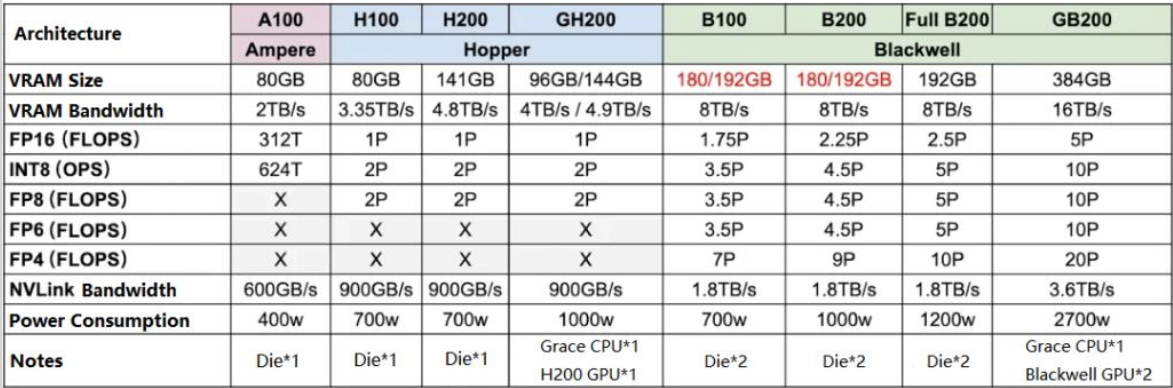
FLOPS = FLoating-point Operations Per Second. An "operation" is a math calculation (e.g. adding, multiplying two floating-point numbers together).
- 💡 FLOPS is a measurement of raw computing speed! It specifies exactly how many floating-point math problems a processor can solve in 1 single second.
- T (TeraFLOPS) = trillions of operations per second
- P (PetaFLOPS) = quadrillions of operations per second (1 P = 1000 T)
- FP16: 16-bit floating-point numbers
- FP8: 8-bit floating-point numbers
- The smaller the bit-size, the less precise the number is, but the faster the computer can do the math.
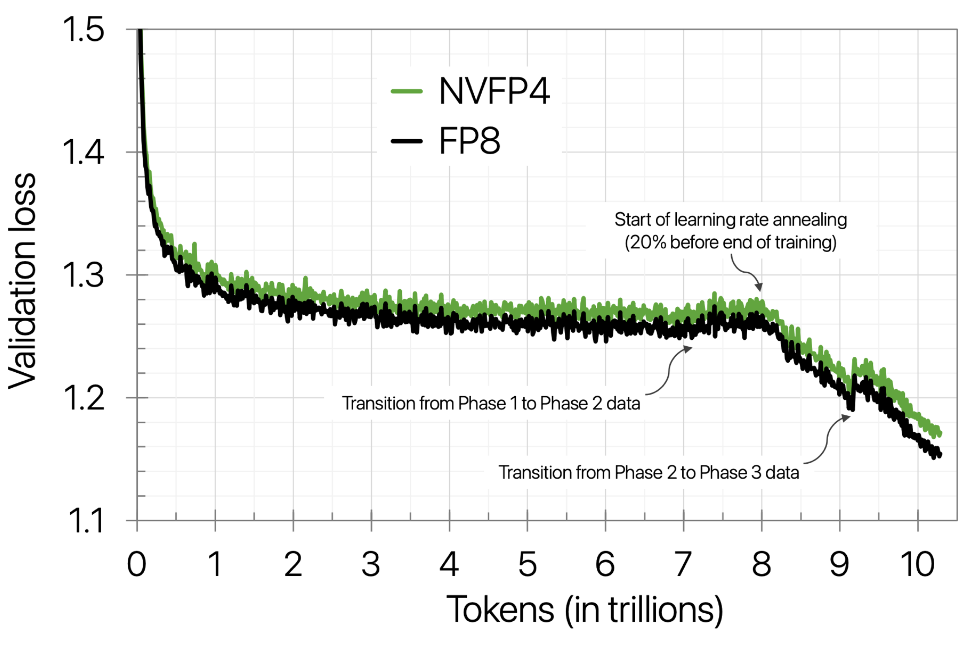
- We can train LLMs in FP4!
Arrays
In C, arrays are just continuous portions of memory accessible via a pointer-like element.
- Creating an array in C:
int x[] = {1, 2, 3, 4}; // make 4 long int array, call it x
int y[10]; // create 10 long int array, call it y (but don't declare values)
int z[5] = {1}; // create 5 long called z, 0th element is 1, rest are 0
- Can do the same thing for char array, but the syntax is a bit more flexible because we also use char arrays for strings:
char a[10] = {'t', 'h', 'e', ' ', 'c', 'a', 't', '.'}; // 10 char array with 2 nulls
char b[] = "the cat."; // 9 long array with "the cat." followed by 1 null
- ⚠️ C code cares about double quotes " " (which specify strings) vs. single quotes ' ' (which specify chars)!!!!!! (Python doesn't care)
How memory works for consecutive arrays
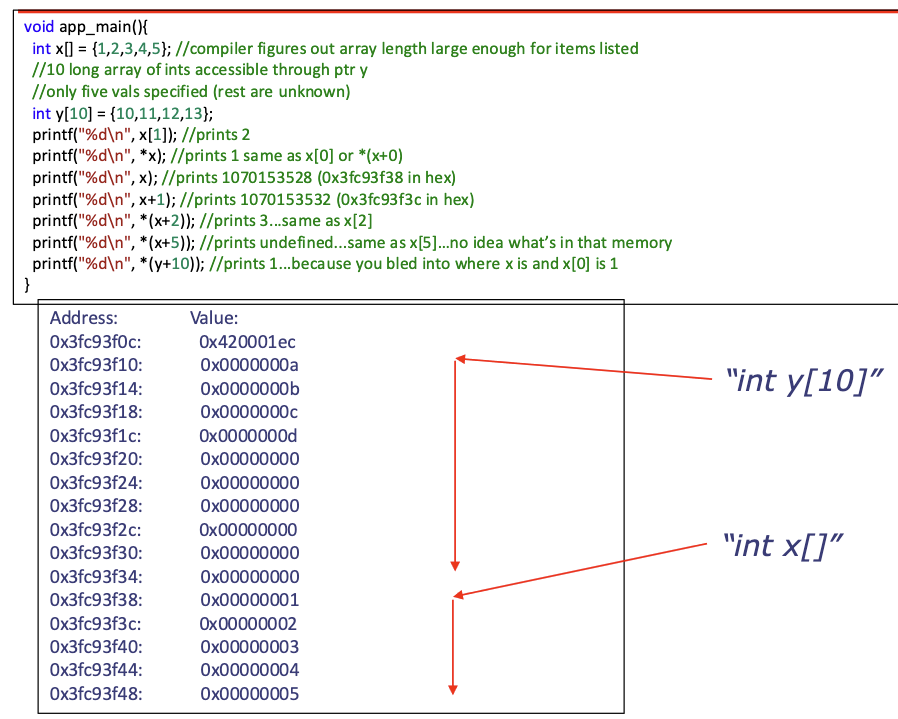
- ⚠️ Problem: The computer doesn't ever "see" the whole memory - it just gets glimpses of it. If you tell the code that there's an array at
0x3fc93f10, yay, but there's nothing in memory that tells the program how much memory is associated with that array: the computer only knows where it starts.- ❓ How can we tell the computer the size of an array?
- Solution 1:
sizeof - Solution 2: Explicitly pass "size of array" variables around (this is the cleaner solution)
- Solution 1:
- ❓ How can we tell the computer the size of an array?
In functions, arrays devolve to pointers !
- ⚠️ In C, all function arguments are passed by value.
- Passing an array in its entirety is expensive (in time and memory). Instead, we pass a pointer that contains the array's address (by value) and therefore implicitly provide a way to pass the array by reference.
- "by value": when you pass a variable by value, the computer creates a complete, independent copy of the data and hands that copy to the function. Here, we provide the address by value (but not the actual array).
- "by reference": when you pass by reference, you aren't giving the function a copy of the data. Instead, you give the function direct access to the original data in memory. Here, we provide the function a way to access the array by reference.
- When an array is handed in as an argument to a function in C, within the scope of the function, all that can be seen is the pointer. Not the array!!!
- Passing an array in its entirety is expensive (in time and memory). Instead, we pass a pointer that contains the array's address (by value) and therefore implicitly provide a way to pass the array by reference.
sizeof
sizeofprovides the size of a data object. It can sort of help but isn't what you think it is!!!
char a[10] = {'t','h','e',' ','c','a','t','.'}; //10 char array with two nulls
char b[] = "the cat"; //8 long array with "the cat" followed by null
int x;
char y;
int z[15];
printf("%d\n",sizeof(a)); //prints 10
printf("%d\n",sizeof(b)); //prints 8
printf("%d\n",sizeof(x)); //prints 4
printf("%d\n",sizeof(y)); //prints 1
printf("%d\n",sizeof(z)); //prints 60
printf("%d\n",sizeof(z)/sizeof(int)); //prints 15
- Because arrays devolve to pointers when passed around to functions in C, while
sizeofcan still be used in a function, it will not provide the size of an array pointed to by a pointer! e.g. below code will um run into issues :"(
int sum_array(int* ai) {
	int sum = 0;
	for (int i = 0; i < sizeof(ai); i++){
		sum+= ai[i];
	}
	return sum;
}
int main(void) {
	int aa[10] = {2,4,6,8,10,12,14,16,18,20};
	int c = sum_array(aa);
	//value of c?
}
- ❓ Why does
sizeofbreak on arrays in functions? Becausesizeofprovides the number of bytes that thing is.- On previous slide, the "thing" is a pointer inside a function that is:
- only 4 bytes (on a 32-bit system)
- only 8 bytes (on a 64-bit system)
- On previous slide, the "thing" is a pointer inside a function that is:
- ⚠️ There is no way to inherently know the size of an array that is passed in as an argument in C.
- You must:
- Pass along variable informing of size of array (general solution)
- Establish some sort of rule-set for the size of the object (C-strings)
- You must:
- ⚠️ Scoping can also make stuff confusing with
sizeof:sizeofworks on things that are in scope - In original C,
sizeofis not a function: it is an operator- This means it is interpreted at compile time rather than run time
- Before the code even runs,
sizeofevaluates all the places where it is used and is replaced with a number. - 🔑 ^ summary:
sizeofonly gives you the size of the thing that the compiler can see in the original declaration
int aa[10] = {2,4,6,8,10,12,14,16,18,20};
int sum_array(int* ai) {
	int sum = 0;
	printf("size of ai: %d\n",sizeof(ai)); // prints 4
	printf("size of aa: %d\n",sizeof(aa)); // prints 40
	for (int i = 0; i < sizeof(ai); i++) { // will loop i = [0, 4)
		sum += ai[i];
	}
	return sum;
}
int main(void) {
	int c = sum_array(aa);
	printf("%d\n",c);
}
sizeofwith functions: if you have a function that is supposed to process many different arrays, those arrays will be handed in via a pointer which will point to the start of those arrays when called.sizeofcan't be called on a pointer since it isn't a run-time function. You won't know ahead of time what is going to come in!
Conclusion
- 📍 Mostly don't use/rely on
sizeoffor array things in functions. - 📍 There is no way to inherently know the size of an array that is passed in as an argument in C.
- You must:
- Pass along variable informing of size of array (general solution)
- Establish some sort of rule-set for the size of the object (C-strings: the rule is to go until you see the null character
\0)strlencounts the characters until it hits the "stop" sign (the null char)- Later notes will talk more about this!
- You must:
- An array has no metadata about its size that is accessible at run-time.
Compile vs. run time
Compile time: "baking a cake from a recipe 🎂"
Compile time is the period when the compiler (like
gccorclang) is reading your source code and translating it into machine code (the binary.exeor.outfile).
- When it happens: Before the program ever starts running on your computer.
- What happens: The compiler checks for syntax errors, makes sure your types match, and performs optimizations.
- The
sizeofconnection: Becausesizeofis a compile-time operator, the compiler doesn't wait for the program to run to figure out sizes. It looks at the data types and hard-codes the numbers directly into the binary.- Example: If you write
int x = sizeof(int);, the compiler literally replacessizeof(int)with the number4(or8) in the final file.
- Example: If you write
Run time: "eating the cake 🍰"
Run time is the period when your program is actually being executed by the CPU.
- When it happens: Every time you type
./my_programor click "Run." - What happens: The computer follows the instructions in the binary. It handles user input, calculates values based on what the user types, and allocates memory dynamically (like using
malloc). - Comparison: While
sizeofhappens at compile time, a function likestrlen()happens at run time. The computer has to actually count the characters one by one while the program is running because it doesn't know what the string will be until then.
C-strings
A C-string is a NULL-terminated
chararray. All elements are ASCII characters! (https://en.wikipedia.org/wiki/ASCII#Printable_characters)
- The C-string is from where the pointer points to → where first NULL occurs
char b[] = "the cat"; // 8 long arrach with "the cat" followed by 1 NULL
- This agreement about first-NULL allows
chararrays to be handed around without a supporting length variable in some cases- 💡 Central idea is that we sacrifice one value in our char encoding space to be the "STOP", similar to what we do in DNA/RNA representations with a stop codon.
string.h
The
string.hlibrary is an important set of functions that allow for convenient C-string manipulation, e.g: determine attributes of strings, manipulate/modify C-strings, compare C-strings...
- We'll look at a subset of the library! All functions found at: https://www.tutorialspoint.com/c_standard_library/string_h.htm
strlen: Determine length of a C-string,int strlen(const char *str);- Input: pointer to a C-string
const char *is a way of saying the function won't modify contents of what is pointed to
- Returns: the length of the string
- "length" is defined as the number of non-NULL characters up until the NULL.
- Input: pointer to a C-string
int custom_strlen(const char *str) {
	char *searcher = str;
	while (*searcher != '\0') {
		searcher++;
	}
	return searcher - str;
}
string.hmanipulation functions:strcpyandstrcatstrcpy: copy a string,char *strcpy(char *destination, const char *source);- Copy to
destinationC-string the contents of C-string pointed to bysource - Returns pointer
destinationmainly for convenience
- Copy to
char *custom_strcpy(char *destination, const char *source) {
	uint32_t i = 0;
	while (*(source + i) != NULL) {
		*(destination + i) = source[i];
		i++;
	}
	// make sure to add back stop NULL to destination after copying contents!!
	destination[i] = 0; // NULL, '\0' will also work
	return destination;
}
- ⚠️ Warnings about
strcpy: e.g., examine the below code:
int main(void) {
	char prez[] = "Sally Kornbluth";
	char buffer[4];
	int len = custom_strlen(prez);
	printf("length of string: %d\n", len);
	custom_strcpy(buffer, prez);
	printf("Original String: \"%s\"\n",prez);
	printf("Copied String: \"%s\"\n",buffer);
}
// will print:
// length of string: 15
// Original String: "y Kornbluth"
// Copied String: "Sally Kornbluth"
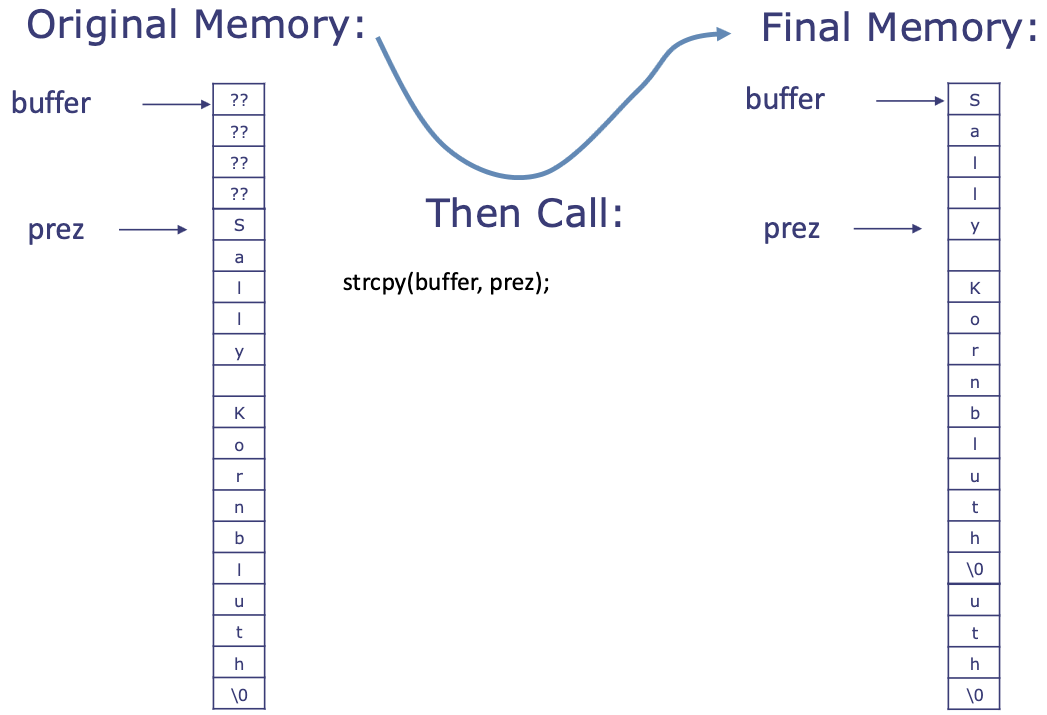
- ^ the problem is that
prezlives afterbufferin memory, so when we callstrcpy, it copies over the memory parts that we don't overwrite!
[TODO FIGURE THIS OUT LATER BRAIN NOT WORKING RN]
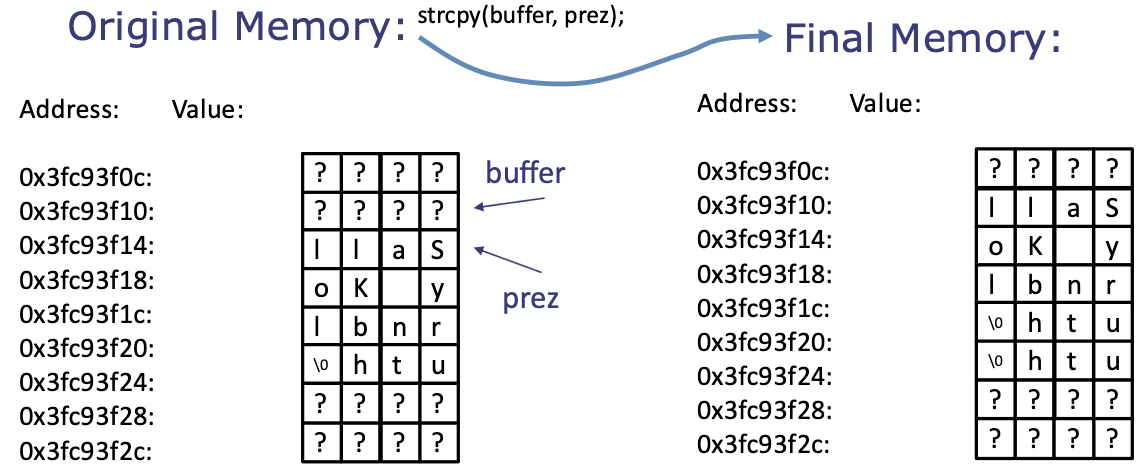
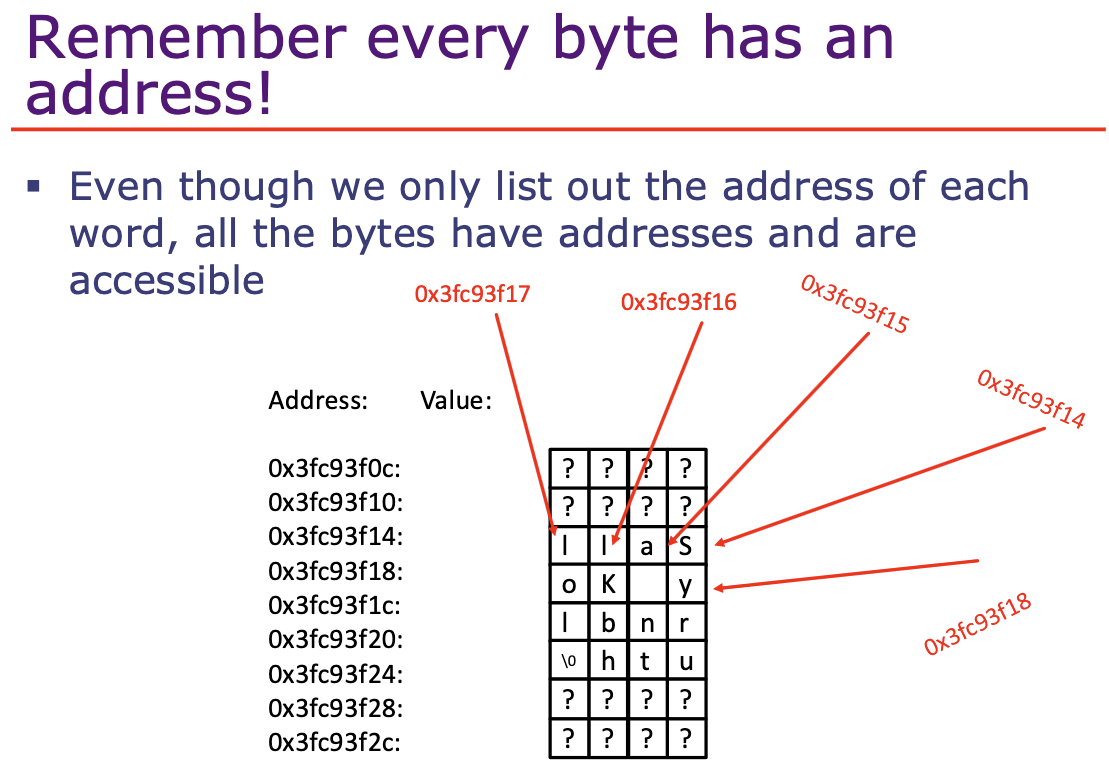
strcat: concatenate a C-string,char *strcat(char *destination, const char *source);- Add onto
destinationC-string the contents of C-string pointed to bysource - Returns pointer to
destinationmainly for convenience.
- Add onto
int custom_strlen ( const char *str );
char *custom_strcpy ( char *destination, const char *source );
char *custom_strcat ( char *destination, const char *source ) {
	return custom_strcpy(destination + custom_strlen(destination), source);
}
strncopy: copy characters from a C-stringstrncat: concatenate -characters from a C-string- ⚠️ Buffer overread/overwrite bug found in openSSL in 2014
- The bug could leak information by not respecting buffer boundaries
- https://en.wikipedia.org/wiki/Heartbleed
- Safer
string.hfunctions:strlcpy: copy characters from a C-string and makes sure to NULL terminatestrlcat: concatenate characters from a C-string and makes sure to NULL terminate
string.h comparison functions
strcmp:int strcmp(const char *str1, const char *str2);strncmp:int strncmp(const char *str1, const char *str2, size_t n);- ^ Both of these compare two C-strings:
strncmpcompares the first charactersstrcmpcompares the entire C-string
- What does "compare" mean? It returns:
<0if the first character that does not match has a lower value in str1 than in str20if the contents of both strings are equal>0if the first character that does not match has a greater value in str1 than in str2
string.h search functions
strchr: Find first instance of character in c-string,char *strchr(const char *haystack, char needle);- looks for first instance of
needlein C-stringhaystackand returns a poitner to it - if it isn't found, it returns a NULL pointer
- e.g. determine if there is an 'l' in "Sally Kornbluth"
- looks for first instance of
strrchr: Find last instance of character in c-string- looks for last instance of
needlein C-stringhaystackand returns a pointer to it - returns NULL if not found
- looks for last instance of
char *custom_strchr ( const char *haystack, char needle ) {
	uint32_t i = 0;
	while (haystack[i] != NULL) {
		if (*(haystack+i) == needle) {
			return haystack + i;
		}
		i++;
	}
	return NULL;
}
strstr: Find location of sub c-string inside c-string- looks for first instance of c-string
needlein c-stringhaystackand returns a pointer the beginning ofneedle - returns NULL if not found
- looks for first instance of c-string
strtok: Tokenize c-string into sub c-strings. (exercise this week!)
sprintf
sprintfis a function included in standard C that is not part ofstring.h, but is often used to do similar tasks asstring.hfunctions.
- 💡 Just like
printf, but writes to char buffer rather than terminal. int sprintf(char *str, const char* format, ...);- Write to
strusing regular string formatting rules like%d, etc... - Function returns the number of characters written!
- Write to
- 🔑 Uses for sprintf:
- Used to replicate/provide slight deviations/improvements on several of the
string.hfunctions - Allows the creation of formatted C-strings rather than just printing them to terminal! e.g.: I want to stringify a computationally determined number:
- Used to replicate/provide slight deviations/improvements on several of the
int i = some_function(19, 86); // return 2012
char temp[10];
sprintf(temp, "%d", i);
// temp now holds the c-string: "2012\0"
// NULL is auto-added in sprintf
- Example: Let's generate a C-string that has every number in it from 0 to 1000! 2 methods: [TODO READ THIS CODE CAREFULLY LATER]
- One function that repeatedly uses
strcat:
//version one using strcat:
char totes[10000000]; //big enough
void build_num_string_1() {
	totes[0] = 0;//null first value
	for (int i =0; i<100000; i++){
		char temp[10];
		sprintf(temp,"%d ",i);
		strcat(totes,temp);
	}
	printf("%s\n",totes);
}
- ^ this takes 0.56 ish seconds to run
- One function that uses
sprintfin conjunction with pointer arithmetic directly:
//version 2 using sprintf and
//pointer arithmetic:
char totes[10000000];//big enough
	void build_num_string_2(){
	totes[0] = 0;//null first value
	int tally = 0;
	for (int i =0; i<100000; i++){
		tally += sprintf(totes+tally,"%d ",i);
	}
	printf("%s\n",totes);
}
- ^ this takes 0.004 ish seconds to run :0!
Some conclusions about string stuff
strcatrepeatedly has to scan the string from the beginning, causing longer and longer run-times for longer and longer strings!- Avoid repeatedly scanning a string if you can help it!
The evolution of the String
- In the evolution of programming languages, one of the first things tacked onto a higher level "string" data type was a piece of meta-data keeping track of string length
- So when we
+=a Python string, that length is already known inside the object! - 🔑 Python's string library is actually many lines of well written C! https://github.com/python/cpython/tree/main/Objects/stringlib
- (CPython is the default, original, and most widely used implementation of the Python programming language! aka., OG Python is essentially a C wrapper :) )
Structs
Structs can have member variables, but do not have member methods or functions.
- Access member variables with dot operator: e.g.
thing.xto accessthing'sxmember - Example struct:
struct Subject {
	int dept;
	int units;
	char name[100];
	int num_students;
};
int main(void) {
	struct Subject our_course;
	our_course.dept = 6;
	our_course.units = 6;
	strcpy(our_course.name, "6.1903: Intro to C and Assembly");
	our_course.num_students = 255;
}
Structs with functions
void make_subject1(struct Subject s) {
	s.dept = 8;
	s.units = 12;
	strcpy(s.name, "8.02: Physics 2");
	s.num_students = 500;
}
make_subject(our_course);
printf("%s has %d students and is in Course %d and is %d credits.\n", our_course.name, our_course.num_students, our_course.dept, our_course.units);
// What will this ^ print?
- 💡 ^ Arguments are always passed by value!!
- So the above code will print the original values defined earlier (
"6.1903: Intro to C and Assembly has 255 students and is in Course 6 and is 6 credits.") -- we passed in a copy ofour_courseinstead of actualour_course, so in-place edits occurred on the copy ofour_course(and therefore were not saved to the outsideour_coursewe defined earlier) - So the re-assigning was futile!
- So the above code will print the original values defined earlier (
Function arguments are passed by value (arguments := things that you pass into the function when calling it).
- To fix the earlier code to actually meaningfully change
our_courseoutside of the function, we can do:
struct Subject make_subject1(struct Subject s) {
	s.dept = 8;
	s.units = 12;
	strcpy(s.name, "8.02: Physics 2");
	s.num_students = 500;
	return s;
}
our_course = make_subject(our_course);
- ❓ One might ask - don't we pass pointers when we pass arrays into functions?
- Yes - we pass the literal value of the address. When you pass a pointer to a function, the computer creates a local copy of that pointer variable.
- Then, in the function:
- If you were to change the pointer itself inside the function, the original pointer in
mainwouldn't change at all, because the function only gets a copy of the original pointer. - BUT if you dereference the pointer, i.e.
*copy_of_address, you go to the physical location this address points to and changes the value stored there, which changes the same thing located at that physical location that the outside pointer points to.
- If you were to change the pointer itself inside the function, the original pointer in
- ⚠️ Is passing a struct into a function a good idea, given that arguments are always passed by value?
- To pass by value means a copy needs to be made - structs can be big, so passing a large thing by value can be:
- Slow
- Use limited memory to make temporary copy - use too much and you could get a stack overflow!
- 📍 So passing a struct by value, while allowed, is often not the best idea.
- 💡 Instead, pass a pointer to structs!
- To pass by value means a copy needs to be made - structs can be big, so passing a large thing by value can be:
Struct pointers
Just like everything else, you can have a pointer to a struct.
- The pointer allows us to reference things in memory (round-about way of passing by reference) and modify it directly!
void make_subject3(struct Subject* s);
make_subject3(&our_course); // call function on pointer to our_course
- ❓ How to access members of struct pointer?
- ⚠️
*s.units = 12;is not going to work, because*has lower priority than. - Recall:
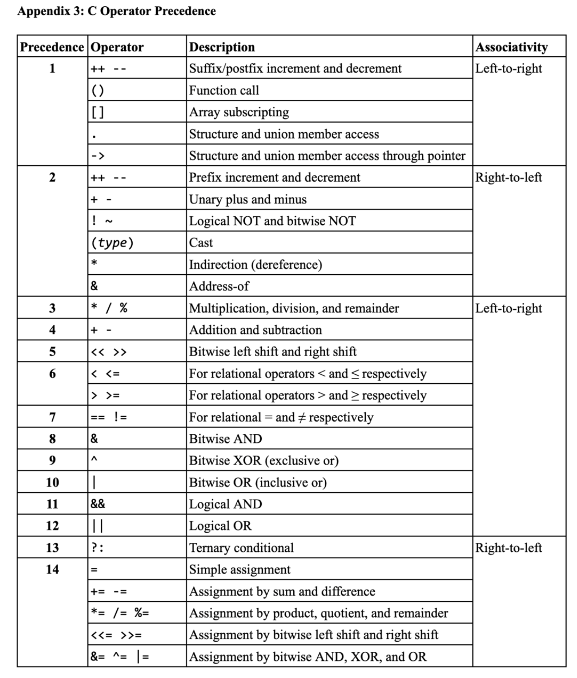
*is higher than. - Instead, we can do:
(*s).units = 12;- This isn't the slickest though ^!
- 🔑 Preferred method:
s->units = 12;where->hides the*+.combo (arrow is equivalent to doing(*s).units)
- ⚠️
- Example code with struct pointer:
void make_subject3(struct Subject* s) {
	s->dept = 8; //or (*s).dept
	s->units = 12; //or (*s).units
	strcpy((*s).name, "8.02: Physics 2"); //or s->name
	(*s).num_students = 500; //or s->num_students
}
make_subject3(&our_course); //call function on pointer to our_course
printf("%s has %d students and is in Course %d and is %d credits.\n", our_course.name, our_course.num_students, our_course.dept, our_course.units);
// ^ prints: 8.02: Physics 2 has 500 students and is in Course 8 and is 12 credits.
How big is a Struct?
- At least as big as the sum of its component parts!
- e.g. ^ sum up the bits for
Subjecton a 32-bit system:
struct Subject {
	int dept;
	int units;
	char name[100];
	int num_students;
};
Couple of other struct things
- No member functions, so no concept of public/private
- Struct can have member structs, just not member of same type (
Subjectcannot have memberSubject) - Can declare structs with starting values: https://en.wikipedia.org/wiki/Struct_(C_programming_language)
- Other ways of initializing structs:
// declare but don't initialize
struct Subject our_course;
// declare and initialize
struct Subject other_course = {9, 12, "9.01: Intro Brain Stuff", 100};
// declare and initialize (named fields)
struct Subject other_other_course = {.dept = 1, .units = 12, .name = "1.01: Intro Prob/Inference", .num_students = 100};
Appendix
- Why is NULL ok for a return value?
- NULL in C is defined as the value 0.
- In general, nothing is going to be sitting at memory location 0.
- Other languages such as Python have a whole datatype to do this - Python's
NoneType
Exercise 3
String stuff
const char **textsis a pointer to a pointer tochar- usually an array of strings- ^ array of read-only strings
char c = 'a';
char *s = "hello";
char *arr[] = {"hello", "world"};
// then:
char **texts = arr;
Parsing and extracting ints
*my_arrayis the same thing as doingmy_array[0]- ^ an array of anything in C is referred to by a pointer to its first element
Parsing
char c = '5';
int x = (int)c; // convert c to an integer
print(x); // prints out 53
- ^ this prints out
53in decimal because the value stored in memory for the char '5' is00110101(53in decimal)- ASCII for '5' is 53!
- ^ to convert char to actual integer value, can use
atoi:
int x = atoi("15");
printf("%d",x+1); //prints 16
x = atoi("-15");
printf("%d",x+1); //prints -14
x = atoi("+1505");
printf("%d",x+1); //prints 1506
x = atoi("abc");
printf("%d",x); //prints 0
printf("%d",x+1); //prints 1
- ⚠️ Things to beware with
atoi:- If non-numbers are fed to it, it returns a 0
atoiexpects achararray and not a singlechar
- 📍
strtoksplits char array at delimiter positions - e.g. split"134&245&111333&89"by&- https://cplusplus.com/reference/cstring/strtok/
strtokis a stateful function: it is designed to be called multiple times- ⚠️ If you try to pass a
charrather than achar *as the second argument tostrtok, will get a compilation of the form:invalid conversion from 'char' to 'const char*' [-fpermissive](this will also happen if you try to usestrcatorstrcpywith a singlecharrather than with a pointer to achar)
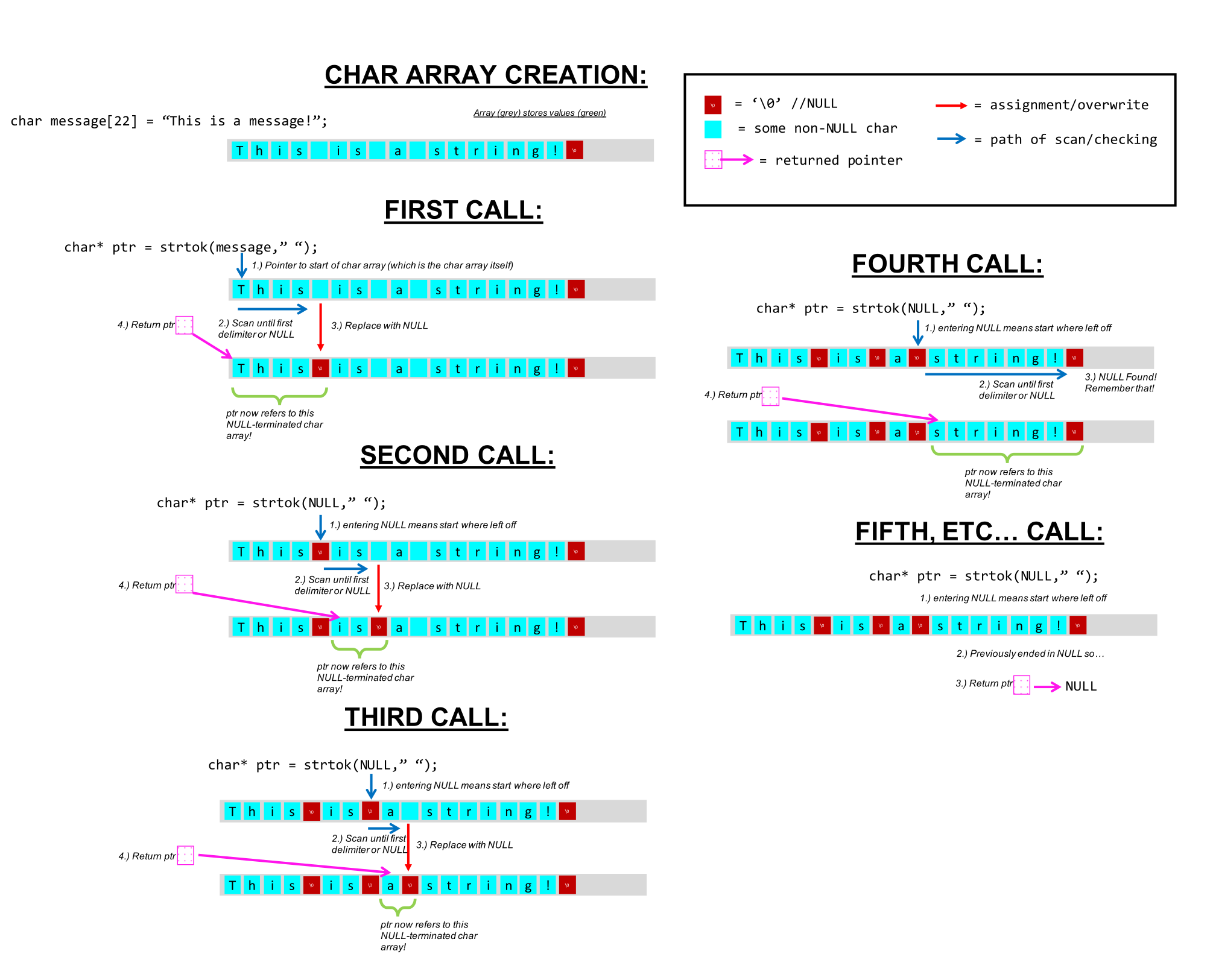
Some strtok practice
char my_string[] = "Don't Be Suspicious. Don't Be suspicious. Don't be Suspicious. Don't be suspicious.";
char* my_ptrs[10];
int my_addrs[10];
You first run:
int ms_addr = (int)&my_string;
printf("0x%x\n",ms_addr);
And get back: 0xf77b
You then proceed to run:
my_ptrs[0] = strtok(my_string,"b");
my_addrs[0] = (int)my_ptrs[0];
printf("0x%x\n",my_addrs[0]);
- Q: What gets printed?
0xf77b - Q:
my_ptrs[0]is pointing to a string. What string is it pointing to?- "Don't Be Suspicious. Don't Be suspicious. Don't "
You then proceed to do the following:
my_ptrs[1] = strtok(NULL,"b");
my_addrs[1] = (int)my_ptrs[1];
printf("0x%x\n",my_addrs[1]);
- Q: What gets printed now?
0xf77b+ len("Don't Be Suspicious. Don't Be suspicious. Don't ") + 1 (pointer skips the newly inserted NULL) =0xf77b+ 48 + 1 =0xf77b+ 49 (decimal) =0xf7ac
- Q:
my_ptrs[1]is pointing to a string. What string is it pointing to?- "e Suspicious. Don't "
my_ptrs[2] = strtok(NULL,"b");
my_addrs[2] = (int)my_ptrs[2];
printf("0x%x\n",my_addrs[2]);
- Q: What gets printed now?
0xf7ac+ len("e Suspicious. Don't ") + 1 = 0xf7ac + 21 =0xf7c1
- Q:
my_ptrs[2]is pointing to a string. What string is it pointing to?- "e suspicious."
We then run this line:
my_ptrs[3] = strtok(NULL,"b");
- Q: What value will be stored in
my_ptrs[3]?- NULL
We then proceed to run the following:
my_ptrs[4] = strtok(my_string,"p.");
my_addrs[4] = (int)my_ptrs[4];
printf("0x%x\n",my_addrs[4]);
- Q: What gets printed?
0xf77b
- Q:
my_ptrs[4]is pointing to a string. What string is it pointing to?- "Don't Be Sus"
- 💡 Core idea of how
strtokworks:strtokresets when you feed it a non-NULL first argument- ^ so when we called
my_ptrs[4] = strtok(my_string,"p.");, the pointer was reset to the head ofmy_string(0xf77b) NULLfirst argument (strtok(NULL...)) = continue from where you left off
- ^ so when we called
int_extractor implementation using strtok
Review this before the exam!
void int_extractor(char* data_array, int* output_values, char delimiter){
    int i = 0;
    char delim_str[2] = {delimiter, '\0'};
    char *res = strtok(data_array, delim_str);
    while (res != 0) {
        output_values[i] = atoi(res);
        i += 1;
        res = strtok(NULL, delim_str);
    }
}
Lecture 4: RISC-V Assembly
Sum an array
int i = 0;
int arr_sum = 0;
int arr_len = 10;
while (i < arr_len) {
	int val = *(arr + i);
	arr_sum += val;
	i++;
}
- Need to translate C/Java/Python/... (high-level languages) into a language that just uses the general-purpose processor's list of instructions that it can execute using its hardware
- This language is assembly!
- Assembly then gets translated into binary that the processor has hardware to decode → machine code
Takeaway: Assembly language tells us the exact steps that a processor carries out when running through a program.
- Assembly and machine code are the same thing! Just the former is for the programmer, latter is for machine (but exists 1-1 mapping)
What is an assembly language program?
An assembly language program is a sequence of instructions which ...
Instruction set architecture (ISA)
ISA: The contract between software and hardware.
- Functional definition of operations ...
- 2 main approaches to ISAs:
- CISC (complex instruction set computer)
- RISC (reduced instruction set computer)
- Apple: used to be CISC (x86) and now is RISC (ARM)
CISC philosophy
- Fundamental instructions are more complex
- Larger instruction set
- Programs that have fewer instructions
- e.g. Intel (x86)
RISC philosophy
- Fundamental instructions are more basic
- Faster to processor to execut
- Smaller instruction set
- Programs with longer instructions
- e.g. ARM
RISC-V ISA
- A newer (2010), open free ISA from Berkeley
- Several variants:
I: Base integer instructionsM: multiply and divide ...- etc.
- We will study the
RV32Iprocessor, which is the base integer 32-bit variant.
Registers vs. memory
- Both store information!
| Registers | Memory |
|---|---|
| Expensive | Cheap |
| Physically large | Very dense/small |
| Quick to access | Slower to access |
| Actually in the computer itself | Further away/separate from the computer |
Conclusion for most computers (compromise): Have a small set of registers (maybe 20 or 30) that you use as much as possible as temporary variables; use memory as rarely as possible!
RISC-V Processor storage
Registers:
- 32 general-purpose registers
x0-x31 - Each register is 32 bits wide
x0 = 0always
Memory:
- Each memory location is 32 bits wide - 1 word = 32 bits = 4 bytes
- When the processor loads/stores data, usually does it in 4-byte chunks.
- Each memory address refers to 1 byte (8 bits) - "Memory is byte (8 bits) addressable"
- Addresses of adjacent words are 4 apart: 1 word = 32 bits = 32/8 → 4 addresses
- So memory looks like:
Address     Data
0x00        [1 byte]
0x01        [1 byte]
0x02        [1 byte]
0x03        [1 byte]
^ collectively the addresses for 1 word
- Addresses are 32 bits: each address is represented using 32 bits
- So the total number of unique addresses is
- Can address bytes of words:
- 32-bit address → unique addresses
- Each address points to 1 byte → bytes = 4 GB
- 1 word = 4 bytes →
RISC-V Instructions
- 3 types of operations:
- Computational: Perform arithmetic and logical operations on register
- Loads and stores: Move data between registers and main memory
- Control flow: Change the execution order of instructions
(1) Computational instructions
- 4 main classes of operations:
- Arithmetic
- Comparison
- Bitwise logical
- Shift
- 2 formats: (of instructions)
- Register-register instructions
- Register-immediate instructions
| Format | Arithmetic | Comparisons | Logical | Shifts |
|---|---|---|---|---|
| Register-register | add, sub | slt, sltu | and,or, xor | sll, srl, sra |
| Register-immediate | addi | slti, sltiu | andi, ori, xori | slli, srli, srai |
- Register-register instructions:
- Format:
oper rd, rs1, rs2 - 2 source operand registers:
rs1,rs2 - 1 destination register for result:
rd rd, rs1, rs2could be the same or different!
- Format:
- e.g.
add x3, x1, x2  # x3 ← x1 + x2
slt x3, x1, x2  # if x1 < x2 then x3 = 1 else x3 = 0
and x3, x1, x2  # x3 ← x1 & x2
sll x3, x1, x2  # x3 ← x1 << x2
- Register-immediate instructions
- Format:
oper rd, rs1, constant - 1 source operand comes from register:
rs1 - 1 source operand comes from constant:
constant(12 bits, 5 for shifts) - 1 destination register:
rd
- Format:
addi x3, x1, 4 # x3 ← x1 + 4
slti x3, x1, 4 # if x1 < 4 then x3 = 1 else x3 = 0
andi x3, x1, 4 # x3 ← x1 & 4
slli x3, x1, 4 # x3 ← x1 << 4
- ^ no
subi, instead useaddiwith negative constantaddi x3, x1, -4=x3 ← x1 - 4
- 💡 All values are binary!!
- Suppose
x1 = 00101; x2 = 00011 add x3, x1, x2is adding in base 2!sll x3, x1, x2=00101 << x2 bits=01000- note fixed width shifting!
- Right shifts: logical vs. arithmetic
- Suppose
x1 = 00101; x2 = 00010srl x3, x1, x2=00001sra x3, x1, x2 = 00001
- 🔑 Every bit you shift to the right, you divide by 2.
- Suppose
x1 = 10101; x2 = 00010srl x3, x1, x2 = 00101sra x3, x1, x2 = 11101- Arithmetic shift (1) retains the negativity of negative numbers and (2) retains the effect of dividing by 2 for each bit you shift to the right
- Suppose
- 📍 Logical right shift: shift in 0s; arithmetic right shift: shift in value of most significant bit.
Putting values into registers
- What if we wanted to put
0x123intox2?- ^ can use
addi!
- ^ can use
addi x2, x0, 0x123 # x2 = 0x123 + 0 = 0x00000123
- What if we wanted to put
0x12345678intox2?- ⚠️ We can't just do
addi x2, x0, 0x12345678! The constant in register-immediate instructions is limited to 12 bits.- ❓ Why limited bits for the constant? Because the full instruction itself needs to fit in 8 bits, and specifying source/destination/operation all require bits! The number of bits left for the constant happens to be 12.
addican only compile 12 bits- 💡 Instead: use
lui!
- ⚠️ We can't just do
lui: Load Upper Immediate
- Format:
lui rd, luiConstant- Puts 20-bit constant value (
luiConstant) in the upper 20 bits of a register (rd)- i.e. puts in most significant 20 bits of the 32 bits available!
- Appends 12 zeros to the low end of the register
- Supports putting constants that are larger than 12 bits into a register!
- Puts 20-bit constant value (
- e.g. - What if we wanted to put
0x12345678intox2?
lui x2, 0x12345     # put 0x12345 into upper 20 bits of x2: x2 = 0x12345000
addi x2, x2, 0x678  # x2 = 0x12345000 + 0x678: x2 = 0x12345678
Compound computation
Let's do a = ((b+3) >> c) - 1
- Break up complex expression into basic computations
- Our instructions can only specify two source operands and one destination operand
- Computational instructions can only access registers, not memory
- Assume
a,b,care in registerx1,x2,x3respectively. Usex4fortemp0andx5fortemp1
- Assume
temp0 = b + 3; // addi x4, x2, 3
temp1 = temp0 >> c; // sra x5, x4, x3
a = temp1 - 1; // addi x1, x5, -1
- Yay {this point} concludes our computational instructions!
(2) Loads and stores
- These are the only operations that allow you to move data between registers and main memory!
- Accessing words in memory:
- In 6.190, all RISC-V memory accesses will involve entire 32-bit words
- We will read an entire 32-bit word from memory
- We will store an entire 32-bit word into memory
- However, memory is byte (8-bit) addressable
- Addresses of adjacent words are 4 apart
- ⚠️ Memory addresses used in load and store instructions must be multiples of 4!
- In 6.190, all RISC-V memory accesses will involve entire 32-bit words
RISC-V Load Instruction
- Format:
lw rd, offset(rs1) - Read the 23-bit value stored at the memory address
rs1 + offset- Base address
rs1always stored in a register - Offset
offsetis a 12-bit constant base + offsetsum must be a multiple of 4!
- Base address
- Put that 32-bit value in a register
rdlw x1, 0x4(x0)=x1 ← Mem[x0 + 0x4]- go to address
0x4, take contents and put inx1
- go to address
RISC-V Store Instruction
- Take 32-bit value in register
rs2and store it at the memory addressrs1 + offset- Base address
rs1always stored in a register - Offset
offsetis a 12-bit constant - base + offset sum must be a multiple of 4!
sw x3, 0x10(x0)=Mem[x0 + 0x10] ← x3
- Base address
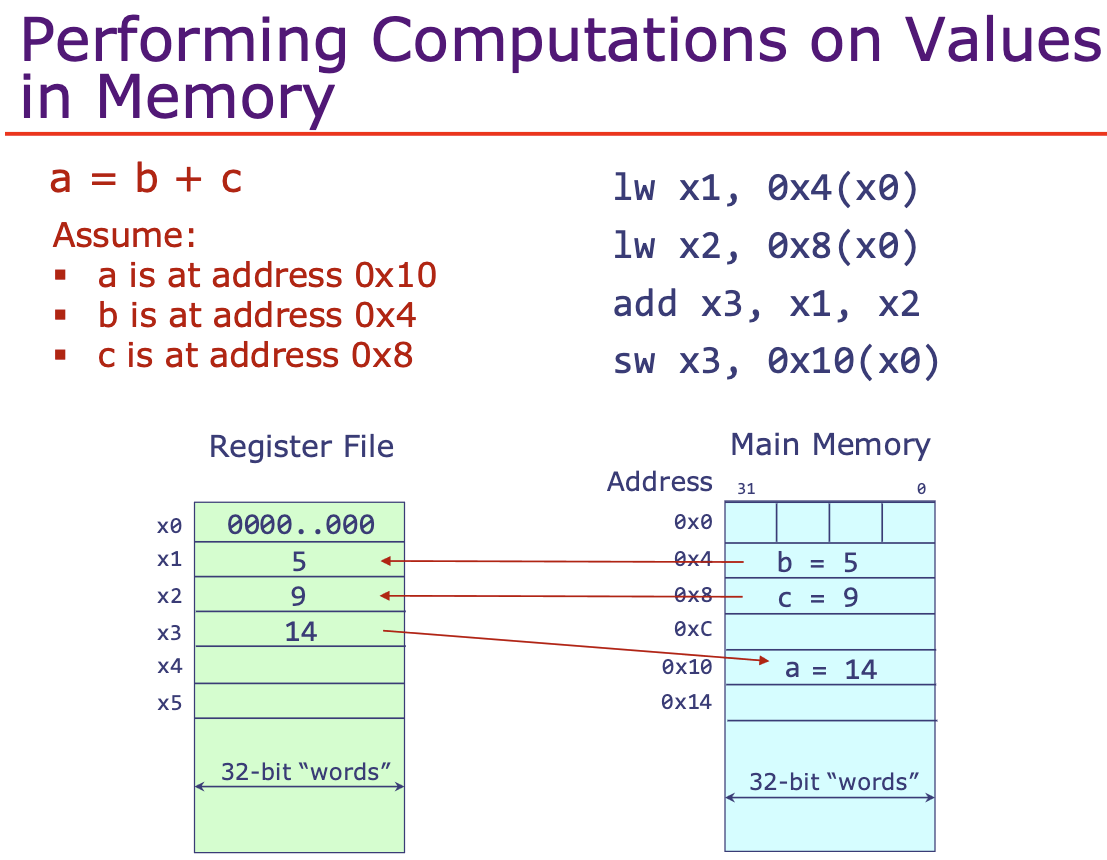
Revisit: Let's sum an array!
Assume we have an array arr with 10 integers starting at memory address 0x700.
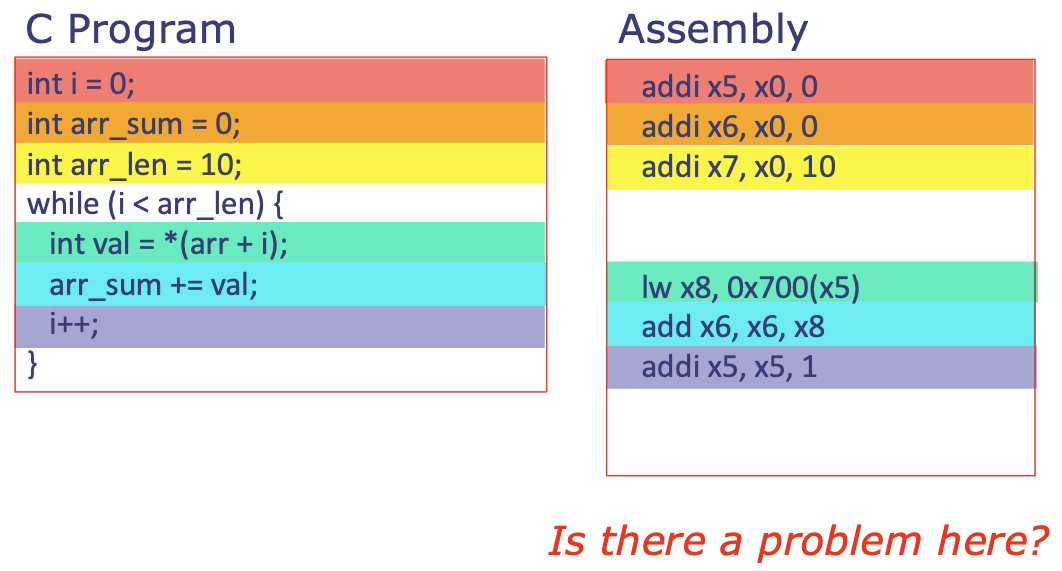
- ⚠️ Yes there is a problem here!! We're adding integers, and integers take up 4 bytes (32 bits).
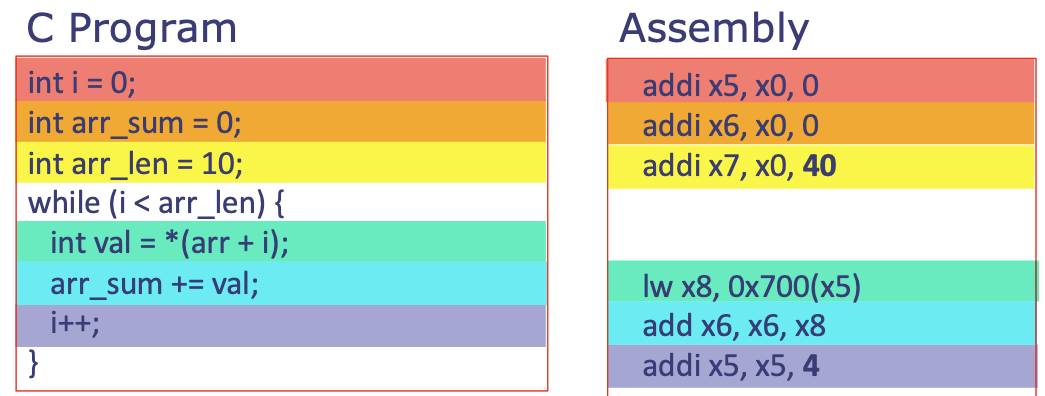
- The current setup adds 1 for each new array entry, but
0x700(1)brings us to0x701, which is not 4 bytes away from0x700(so we're still in the memory for the previous array entry)! We need to get to0x704: so changeaddi x5, x5, 1toaddi x5, x5, 4 - ^ Accordingly,
arr_lencan't be tracked as10→ needs to be40in order to cover all 10 integers!
- The current setup adds 1 for each new array entry, but
- ^ Corrected code:
Now let's do the while loop in assembly!
(3) Control flow
We detour to understand how assembly works first and then come back to this in a later section.
How does assembly work?
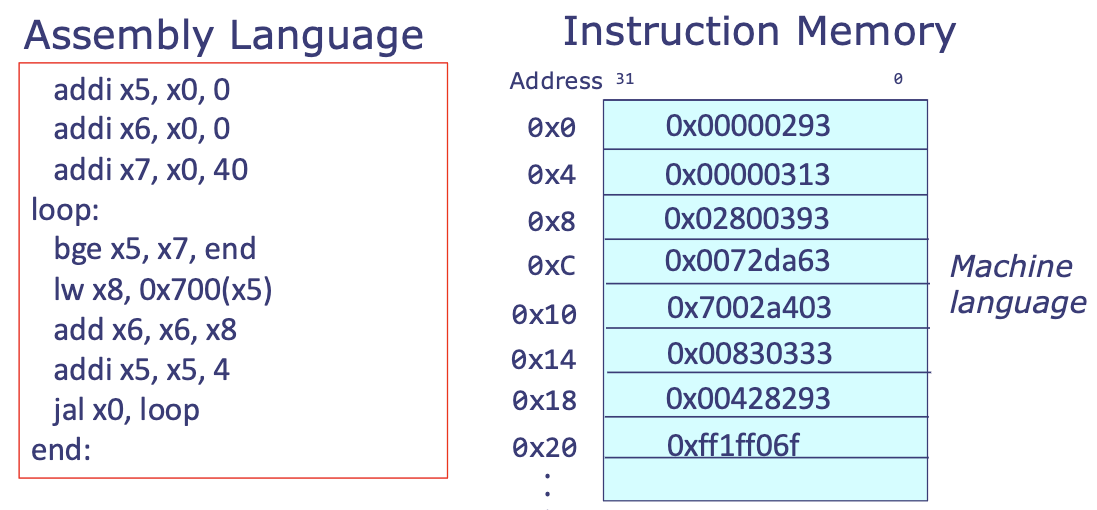
Instructions are stored in memory
- Assembly language gets translated into machine language, which is then stored in memory for the processor to read as it executes the program.
- In RV32I, all instructions are 32 bits. More on this in a bit!
- e.g.
How does the computer know where it is in the program?
- A RISC-V processor has a special register called the program counter (pc).
- Holds the memory address of the current instruction
- Processor uses this address to fetch the instruction from memory
- Then it decodes and executes it
- An assembly program will always continue to the next instruction (
pc = pc + 4) unless otherwise told by a control flow instruction (pc = pc + offset)- 📍 Recall: Instructions are 32 bits (1-word), and memory is 8-bit addressable, so
pc = pc + 4to move us the equivalent of 32 bits in memory - The
offsetis the distance between the memory address of the current instruction and the memory address of the instruction the program is jumping to
- 📍 Recall: Instructions are 32 bits (1-word), and memory is 8-bit addressable, so
- 2 main types of control flow instructions:
- Conditional branch: branch (
jump) only if a condition is met - Unconditional branch: always
jump
- Conditional branch: branch (
^ Allow us to create conditional (
if/else) statements and loops (while/for)!
(3) Control flow, revisited!
Labels
- When writing assembly, you can place labels to give convenient names to lines of instructions
- When you need to branch or jump to another part of your code, you just use the label for that code, e.g.
some_code: addi x5, x0, 521  # refers to addi x5, x0, 521
some_other_code:             # refers to the instruction immediately below it, lui x2, 0x12345
	lui x2, 0x12345
	addi x2, x2, 0x678
- ⚠️ Labels are not functions at all!!!!!!! They are simply a tag that makes it easier for the programmer to refer to an instruction (specifically refer to the address at which this instruction is stored for the computer).
- This is why a label has no size - takes up no space in memory! It is just a nametag we stick on to the instruction address for ease of programming.
-
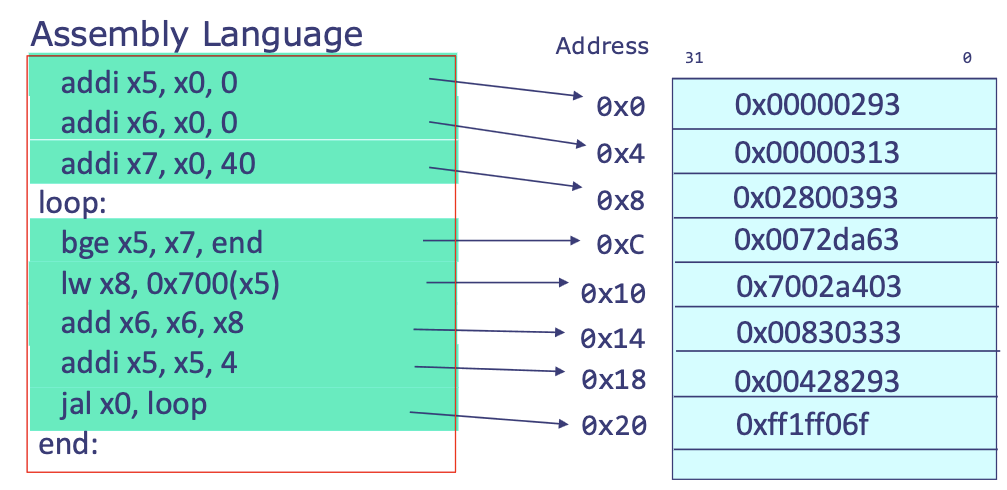
- Labels do not generate machine code, do not occupy memory at runtime, ... - they exist only during assembly and linking!
Conditional branch instructions
- Format:
comp rs1, rs2, label- First performs comparison to determine if branch is taken or not:
rs1 comp rs2 - If comparison returns
True, then branch is taken (jump tolabel), else continue executing program in order.- Updates program counter (
pc) accordingly
- Updates program counter (
- First performs comparison to determine if branch is taken or not:
| Instruction | beq | bne | blt | bge | bltu | bgeu |
|---|---|---|---|---|---|---|
comp | == | != | < | >= | < | <= |
- e.g.
beq x1, x2, label=if x1 == x2, jump to label. else go to next instruction - Conditional branch example: Assume
x1 = a, x2 = b, x3 = c
if (a < b) {            // bge x1, x2, else
	c = a + 1;          // addi x3, x1, 1
} else {                // beq x0, x0, end ← unconditional jump to end if you executed if branch!
	c = b + 2;          // else: addi ax3, x2, 2
}                       // end:
Unconditional branch instructions
jal: unconditional jump and link [today we'll ignore the linking part of this instruction]- Format:
jal rd, label - Jump to instruction following
label- program counter (
pc) updates to be address of that instruction
- program counter (
- Link (next lecture): stored in register
rd jal x3, somewhere= jump to instruction indicated by labelsomewhere, store link inx3
- Format:
jalr: unconditional jump via register and link- Format:
jalr rd, offset(rs1) - Jump to instruction specified by
rs1 + offset- program counter (
pc) updates to be address of that instruction rs1is a register,offsetis a constant
- program counter (
- Link (next lecture): stored in register
rd - Can jump to any 32 bit address - supports long jumps that are not possible with
bne,blt, etc (because size of branches are limited in terms of how much they can jump - limited to the number of bits that I have available for coding constants in my instructions)- ^ because
beq x1, x2, labelis actuallybeq x1, x2, offsetto the assembler whereoffset = address(label) - address(current instruction) - And remember: the full instruction
beq x1, x2, labelmust only take up 32 bits! Thus causing a jump size limit.
- ^ because
- 💡 ^ but
jalrdoesn't have this problem!jalstill involves a constant:target = pc + immediate→immediatemust fit inside instruction, limitingjalrjumps to any arbitrary address in memory:target = register + small offset- e.g:
lui t0, upper_20_bits: load upper partaddi t0, t0, lower_12: add lower partjalr x0, 0(t0): jump to full 32-bit address
- 🔑 ^ this mechanism gives us true arbitrary jumps!
- e.g:
- Instructions are all 32 bits, so
offset + rs1address must be a multiple of 4 - e.g.
jalr x3, 4(x1)= jump to instruction indicated byx1 + 4, store link inx3
- Format:
Revisit - let's sum an array!

bge x5, x7, endimplements exiting the loop wheni >= arr_lenjal x0, looprepeats the loop
Instruction encoding
Now let's address - How do we actually turn these assembly instructions into binary instructions?
- Machine language is the binary encoding of assembly instructions
- Binary encoding - just like integers, floats, other data types! Everything is bits
- All RV32I instructions are 4 bytes (32 bits)
- ❓ How do we translate between assembly and instruction encodings? RISC-V ISA tells us exactly how!
- 📍 6 main types of instruction encodings:
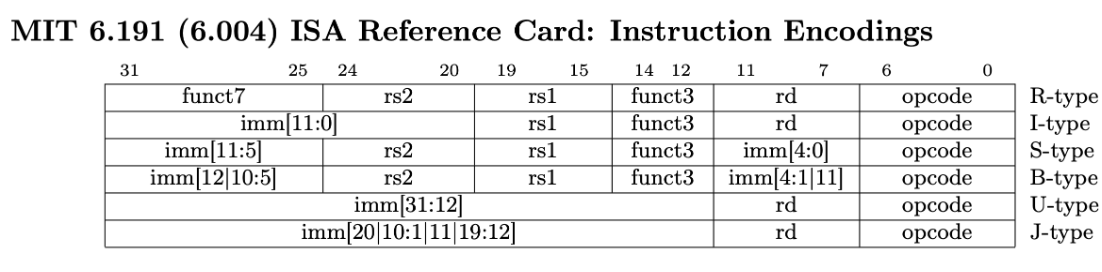
opcode= "operation code" = tells the CPU: what kind of instruction is this?- e.g., load (
lw), store (sw), arithmetic (add,sub)... funct3/funct7= specific operation within that category ^- e.g.
addandsubuse the same opcode (R-style arithmetic) - how do we distinguish them? usefunct3andfunct7! funct3: subcatgoryfunct7: final disambiguation
- e.g.
- e.g., load (
- R: register instructions
- I: register immediate computational
- B: branch
- U: lui
- J: jump
Full instruction set:
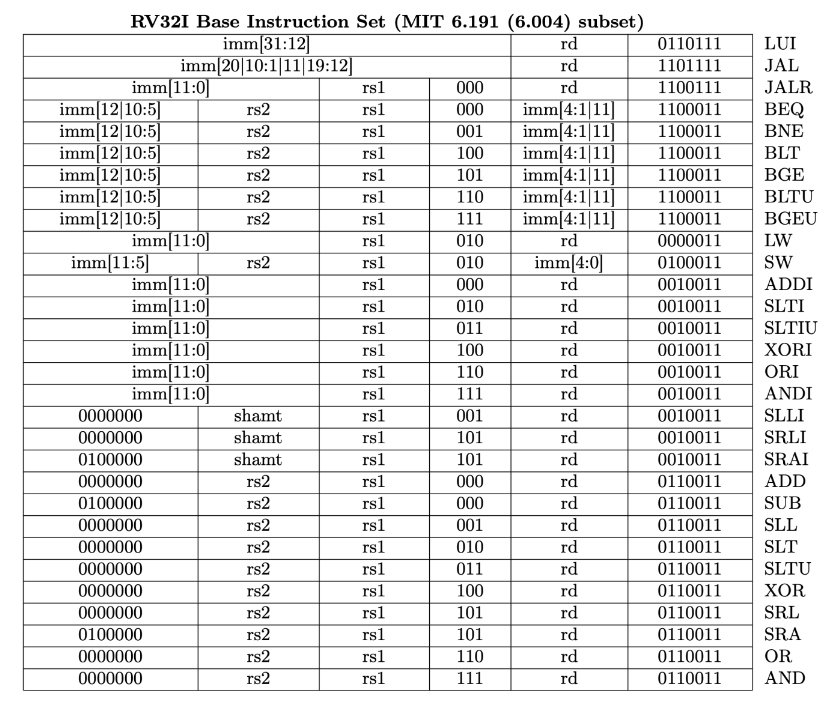
R-type: Register-register instruction format
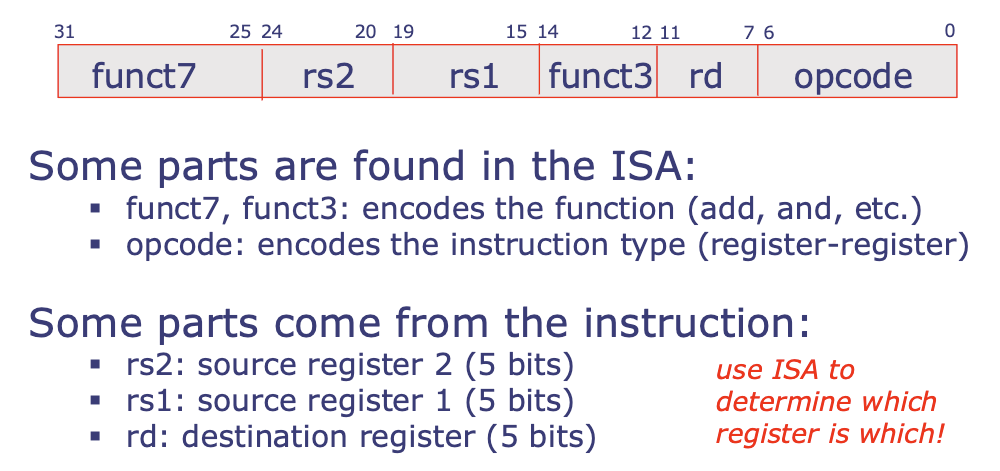
- Why do we use 5 bits for the registers?
- Because we have 32 registers! → need 0-31 to specify all of them → 5 bits to specify a register
I-type: Register-immediate instruction format
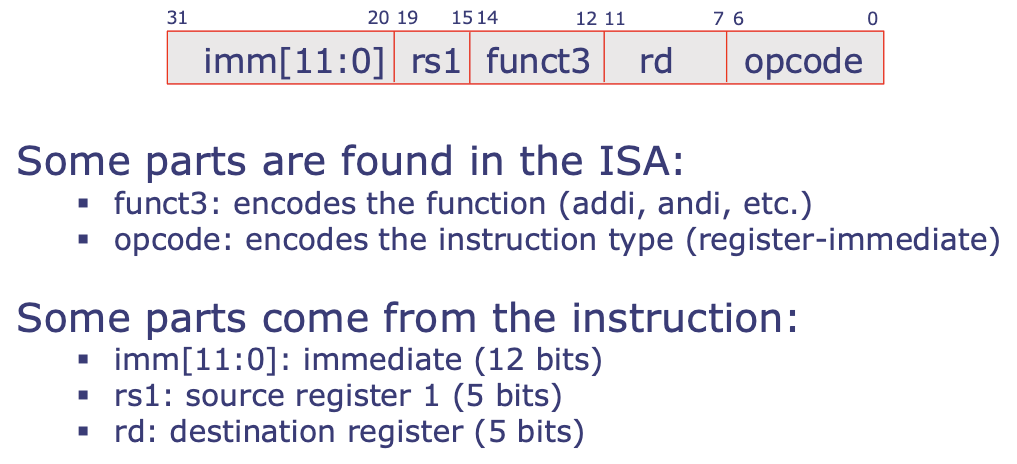
- Why do we use 12 bits for the constant?
- Because we only have 12 bits left out of the 32 bits an instruction can take up - we need all the other ones for specifying registers, instruction type, etc.!
Other types?
In recitation!
Applying all these ideas!
Suppose you're walking down the street and you come across the following blocks in memory:
| Address | Data |
|---|---|
0x10FA0 | 0b00100000100100000000001010010011 |
0x10FA4 | 0b00001011000100000000001100010011 |
0x10FA8 | 0b00000000010100110100001010110011 |
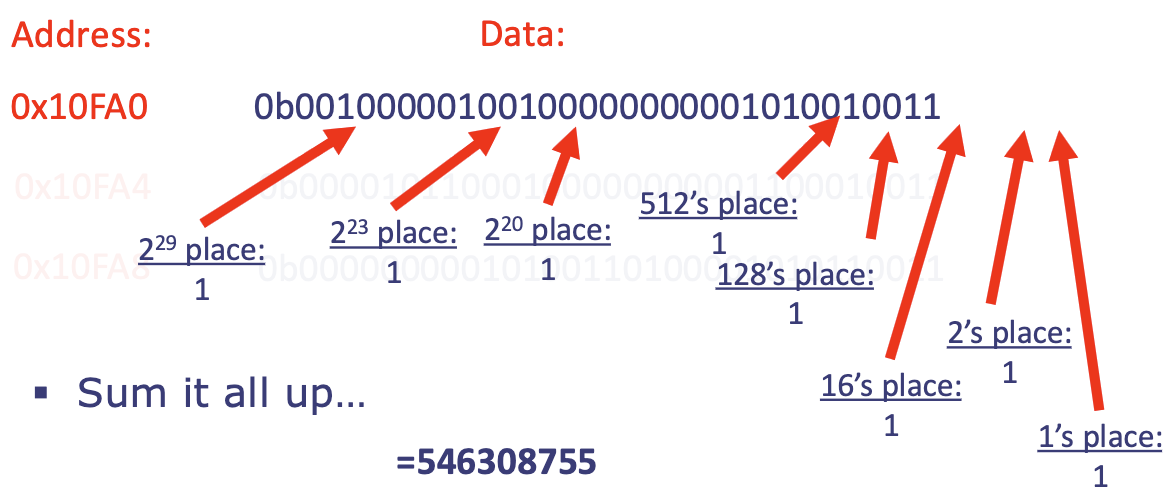
- What does it mean ^? Depends on how we're supposed to interpret it!
- If the value at
0x10FA0is an unsigned int: -
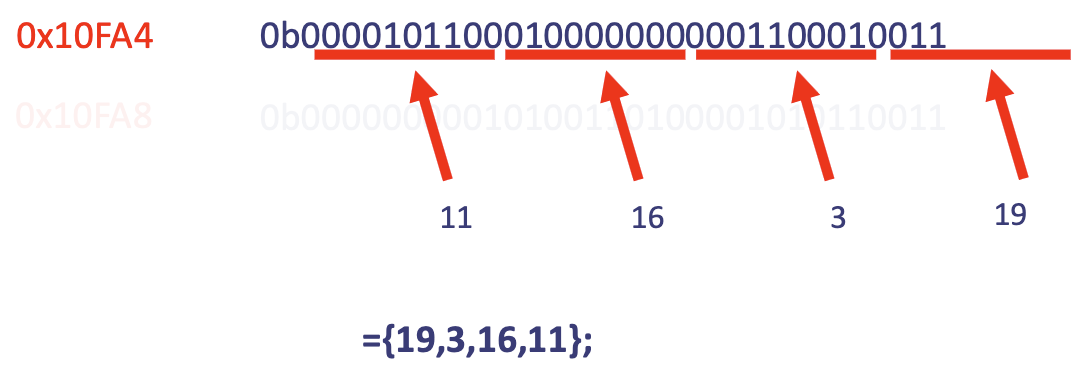
- If the value at
0x10FA4is fouruint8_tsin an array: -
- If the value at
0x10FA8is a float: -
- ❓ How do we know if the value at
MEM_ADDRESSis data or an instruction?- 📍 If the program pointer points to some
MEM_ADDRESS, it is interpreted as an instruction!
- 📍 If the program pointer points to some
- If the value at
0x10FA0is an instruction:0010011(last 7 bits) = register immediate (from ISA sheet) - ⚠️ THE COLORING BARS IN THE BELOW FIGURES ARE OFF, DO NOT READ BASED ON THAT
-
- Instruction at
0x10FA4?-
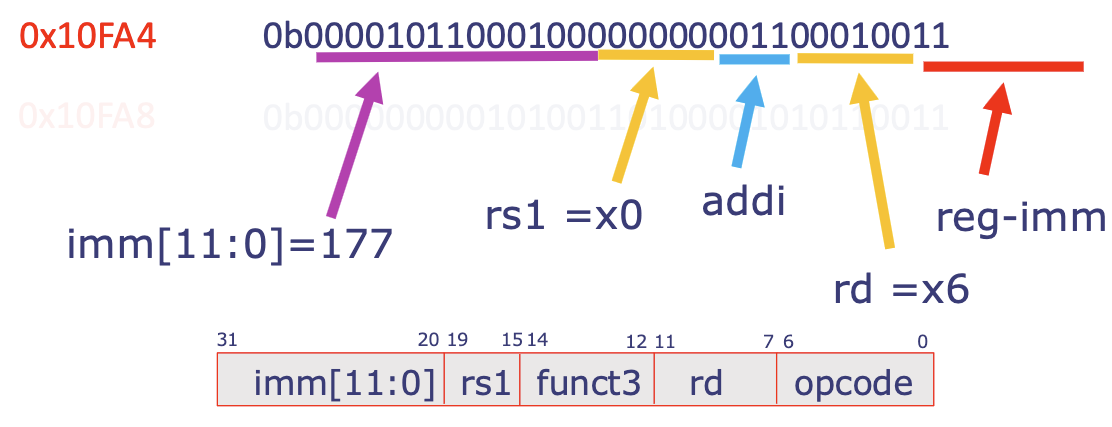
0010011= register immediate00110= 6 →rd = x6- ...
-
- Instruction at
0x10FA8?
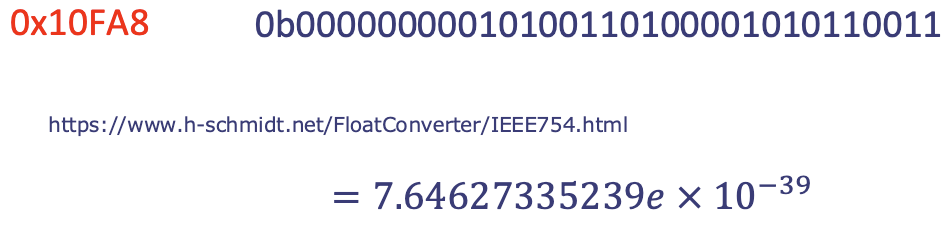
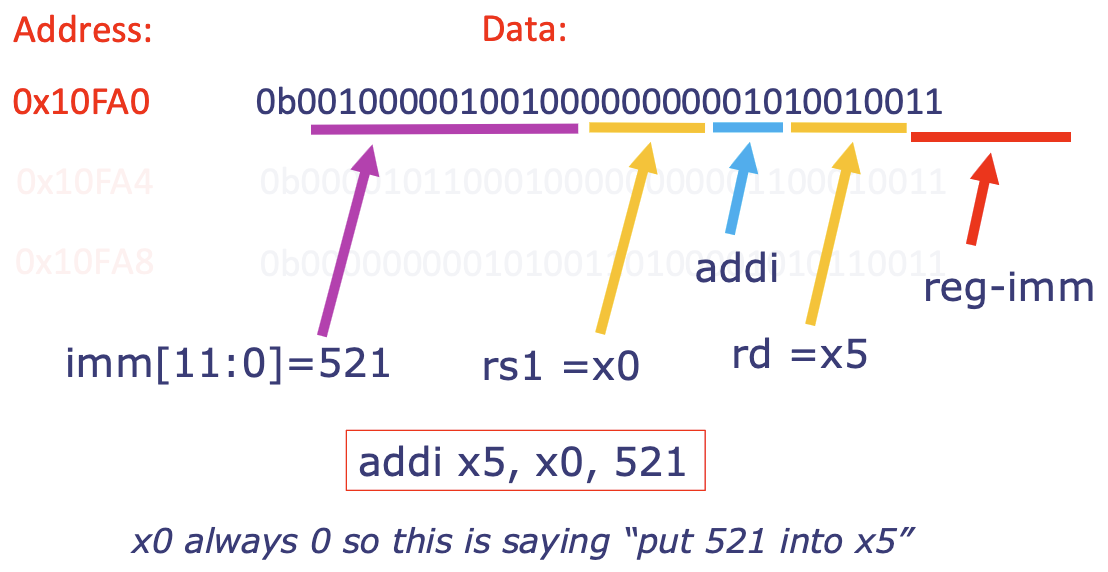
0b 0000000  00101  00110  100      00101  0110011
	funct7  rs2    rs1   funct3     rd    opcode
- opcode:
0110011= R-type instruction! (reg-reg) according to ISA sheet rd = 00101 = 5→ registerx5(save tox5)funct3 = 100,funct7 = 0000000→xoroperation according to ISA sheet!rs1 = 00110 = 6→ registerx6rs2 = 00101 = 5→ registerx5- 🔑 ^ combined:
xor x5, x6, x5
Data memory vs. instruction memory
- Data will live in one part of the memory
- Program (instructions) will live in another part of the memory.
- Instruction memory is usually write-protected (don't want to change program during runtime)
Looking into the future ;)
- Pseudoinstructions: not real!
- While writing assembly, these can save a few keystrokes or lines - makes life for the programmer easier! (concept similar to keyboard shortcut commands)
- Registers and their names:
- The registers all have "symbolic names" which more accurately reflect their expected usage and "conventions" we must adhere to when using them
- ⚠️ Instruction encodings (machine code) always use the
x-register!- (i.e., the hardware only knows registers as numbers
x0-x31-- not names likesp,ra,t0etc. [these latter symbolic names are for us humans, not for the machine])
- (i.e., the hardware only knows registers as numbers
- We'll cover these next week!
Next lecture: Implementing procedures in assembly.
Recitation 4
Translating C to Assembly
Assume a is stored at address 0x1000, b is stored at 0x1004, c is stored at 0x1008. All values are 32-bit signed integers.
- How to execute
a = b + 3 * c?
# 1. Load input variables into registers
# THIS WILL NOT WORK: addi x5, x0, 0x1000 → intermediate cannot be more than 12 bits!
# ^ use lui instead
lui x5, 0x1 # auto shifts 12 bits to the left → 0x1 << 12 = 0x1000
lw x6, 4(x5)
lw x7, 8(x5)
# 2. Calculate a = b + 3*c
slli x8, x7, 1
add x8, x8, x7
add x8, x8, x6
# 3. Store result into memory location for a
sw x8, 0(x5)
- How to execute:
if (a > b) { c = 17; }?
    # 1. Load input values into registers
    lui a1, 0x1
    lw a2, 0(a1) #a
    lw a3, 4(a1) #b
    # 2. Branch to end if a <= b (or b >= a)
    bge a3, a2, end
    # 3. Prepare result
    addi a4, x0, 17
    sw a4, 8(a1) # c = 17
end:
- How to execute:
int sum = 0;
for (int i = 0; i < 10; i++){
	sum += i;
}
    addi a1, zero, 0
    addi a2, zero, 0
    addi a3, zero, 10
loop:
    add a1, a1, a2   # a1 = a1 + a2 or sum = sum + i
    addi a2, a2, 1   # i = i+1
    blt a2, a3, loop # branch to beginning of loop body
- Translate:
for (int i = 0; i < 10; i++) {
	c[i] = a[i] + b[i];
}
    lui a1, 0x1
    addi a1, a1, 0x100 # a1 = address of a[0]
    lui a2, 0x2        # a2 = address of c[0]
    addi a3, zero, 0     # a3 = 0 (i)
    addi t1, zero, 10
loop:
    slli a4, a3, 2   # a4 = 4 * i
    add a5, a1, a4   # a5 = address of a[i]
    add a6, a2, a4   # a6 = address of c[i]
    lw a7, 0(a5)     # a7 = a[i]
    lw t2, 0x100(a5) # t2 = b[i]; b is offset from a by 0x100
    add a7, a7, t2   # a7 = a[i] + b[i]
    sw a7, 0(a6)     # c[i] = a[i] + b[i]
    addi a3, a3, 1   # i = i + 1
    blt a3, t1, loop # branch back to loop if i < 10
Lab 4: Assembly
All C functions ultimately get assembled into assembly code. On the ESP32, these instructions get compiled into RISC-V assembly language.
4.2) RISC-V Assembly & PlatformIO
4.2.2) Handling function arguments & return values
- 📍 Assembly doesn't have variable names: just 32 registers
- The same registers are always dedicated to holding function argument and return values:
- Function arguments:
a0-a7 - Function return values: registers
a0-a1
- Function arguments:
- Function arguments must be placed in these specific registers before the function is called:
- First argument goes in
a0, second goes ina1, ...
- First argument goes in
- Function return values must be placed in the dedicated registers before the function returns (via the
jalr x0, 0(ra)instruction)- Most functions return only one thing, and that goes in register
a0 - If there is a second return value, that is placed in
a1
- Most functions return only one thing, and that goes in register
- The same registers are always dedicated to holding function argument and return values:
e.g.
int pinRead(int pin_num) {
	// pinRead code here
	return val;
}
- Before any call to
pinRead(), the generated assembly program would put the valuepin_numin registera0. If there happened to be a 2nd argument, that would be placed ina1. A third argument would be placed ina2... and so on untila7. Order matters here! - Before returning from
pinRead(), the assembly program would place the return value (in this case the bit value read from the GPIO pin) in registera0
4.2.3) Assembly (.S) files
Header:
.section .text # indicates a code segment
.align 2 # specifies how data should be arranged in memory
//.globl pinSetup # makes pinSetup able to be used outside of this file
.globl pinWrite # makes pinWrite able to be used outside of this file
.globl pinRead # makes pinRead able to be used outside of this file
.globl setPixel # makes setPixel able to be used outside of this file
.globl eraseBuffer # makes eraseBuffer able to be used outside of this file
Assembly uses
#for comments (C uses//)
- Some things to know:
jalr x0, 0(ra)instruction is how the program will return from each procedure- this should be the last instruction in each procedure
- if you delete it, the program will not return!!
- base instruction set list: https://llp.mit.edu/6190/_static/S26B/resources/references/riscv_isa_reference.pdf
- once you start using control flow instructions (e.g. branching and jumping), you'll need to add labels to your program.
- because all of these procedures are located within the same file, you should not use the same label name twice!
5) GPIO in Assembly
5.1) Accessing memory using assembly
- ⚠️ There are only two RISC-V assembly instructions that interact with memory:
- "load word"
lw: reads a 32-bit value from a given memory location - "store word"
sw: writes a 32-bit value to a given memory location
- "load word"
int *mem_address = 0x20000000       // the value of interest is stored at address 0x20000000
int value_at_mem_address = *mem_address
^ in assembly, this would look like:
lui a3, 0x20000 #load value 0x20000000 into register a3 (a3 = 0x20000000)
lw a4, 0(a3) #load 32-bit value stored at memory address 0x20000000 (a3) plus an offset of 0 into register a4 (a4 <= Mem[0x20000000])
- What if we wanted to access the 32-bit value stored at memory address 0x20000004? Rather than performing another
luiinstruction, we can just use an offset in ourlwinstruction:
lw a5, 4(a3) # load 32-bit value stored at memory address 0x20000004 (a3) plus an offset of 4 into register a5 (a5 <= Mem[0x20000004])
^ this offset must be an immediate -- even if the offset is 0!
- 📍 In assembly, we'll be working exclusively with 32-bit values
- So, adjacent memory locations (e.g. array) will be 4 bytes away from each other
e.g.
int arr[3] = {0, 1, 2}; // &arr = 0x20000000
- ^
arr[0]would be stored in memory at address 0x20000000,arr[1]would be at address 0x20000004, andarr[2]would be at address 0x20000008. - ❓ What if we wanted to modify the value stored at a given address?
- ^ in C:
int *mem_address = 0x20000000       // we want to write something to address 0x20000000
*mem_address = 7;                   // write the number 7 to memory address 0x20000000
- ^ in assembly:
lui a3, 0x20000 #load value 0x20000000 into register a3 (a3 = 0x20000000)
addi a4, x0, 7 #notice how we can also use decimal encoding? doesn't need to be hex (a4 = 7)
sw a4, 0(a3)  #store 32-bit value from register a4 (7) in memory address 0x20000000 (Mem[0x20000000] <= 7)
sw a3, 0(a0) # storing what is at a3 to address a0
6) Updating LED display using Assembly
Let's explore how to work with arrays using Assembly!
- Let's translate
eraseBufferfrom C to Assembly.
void eraseBuffer() {
	/* Function that clears screen buffer by setting all bits to 0. */
	for (uint8_t i = 0; i < 8; i++) {
		screen_buffer[i] = 0; // set all 32 bits to 0
	}
}
eraseBuffer:
	addi a1, x0, 8   # upper bound on for loop
	addi a2, x0, 0   # "i" in for loop
looping:
	slli a3, a2, 2   # calculate 4*i
	add a4, a0, a3   # get address of array element by adding base address + 4*i
	sw zero, 0(a4)   # write 0 to memory address
	addi a2, a2, 1   # increment i
	bne a2, a1, looping    # continue looping if i < 8
	jalr x0, 0(ra)   # return from eraseBuffer
- Notes:
- 32-bit architecture, so
memory_addr_of_arr_element_i = array_start_addr + 4*i- Every array element is an
int, which is 4 bytes.
- Every array element is an
- Use
swinstruction to write the value 0 to this location in memory, effectively doingscreen_buffer[i] = 0
- 32-bit architecture, so
^ Memory looks like:
Address:   1000     1001     1002     1003   ...
Content:   [byte]   [byte]   [byte]   [byte]
- We have byte-addressed memory, so addresses of adjacent words are 4 apart: 1 word = 32 bits = 32/8 → 4 addresses
- 💡 Crucial idea: Addresses themselves are just labels → the hardware defines that each +1 address points to the next byte (8 bits).
- ⚠️
0x1000, 0x1001, 0x1002are just numbers:0x1001 = 0x1000 + 1, etc. Nothing about "8 bits" is inherent about adding these hex numbers themselves. The address difference is 1, but the data units they index are 1 byte = 8 bits each. RISC-V defines that memory is byte-addressed, which is how we interpret the address labels0x1000to map to actual data. The hardware is built to match these schemas.
- ⚠️
- 💡 Crucial idea: Addresses themselves are just labels → the hardware defines that each +1 address points to the next byte (8 bits).
- ⚠️ KEY INSIGHT:
lui a7, 0xFFFFF+addi a7, a7, 0xFFFdoes not give you all F's0xFFFF_FFFF!!!!!! Because adding is signed in RISC-V- Instead, to get
0xFFFF_FFFF, this is -1 in signed binary → doaddi a7, x0, -1
- Instead, to get
Postlab 4
Collatz
- ⚠️ TODO: Read into how this works more! Was super cool!
Bubble sort
bubblesort:
  # a0: first memory address of array (DO NOT MODIFY)
  # a1: length of array

  addi a2, x0, 1 # swapped = 1

  loop:
    beq a2, x0, end # if swapped == 0, end sort
    addi a2, x0, 0 # swapped = 0
    addi a3, x0, 0 # i = 0
    jal x0, innerloop

  innerloop:
    addi a7, a1, -1 # a7 = n - 1
    bge a3, a7, end_step # if i >= n - 1 go to loop end

    # loop not ending yet
    slli a4, a3, 2 # a4 = i*4 (integers are 4 bytes)
    add a4, a4, a0
    lw a5, 0(a4) # p[i]
    lw a6, 0x4(a4) # p[i + 1]
    addi a3, a3, 1
    blt a6, a5, conditional
    jal x0, innerloop

    conditional:
      sw a6, 0(a4) # p[i] = p[i+1]
      sw a5, 0x4(a4) # p[i+1] = p[i]
      # LED UPDATE CODE START
      addi sp, sp, -36
      sw a0, 0(sp)
      sw a1, 4(sp)
      sw a2, 8(sp)
      sw a3, 12(sp)
      sw a4, 16(sp)
      sw a5, 20(sp)
      sw a6, 24(sp)
      sw a7, 28(sp)
      sw ra, 32(sp)
      jal ra, arrayViz
      lw a0, 0(sp)
      lw a1, 4(sp)
      lw a2, 8(sp)
      lw a3, 12(sp)
      lw a4, 16(sp)
      lw a5, 20(sp)
      lw a6, 24(sp)
      lw a7, 28(sp)
      lw ra, 32(sp)
      addi sp, sp, 36
      # LED UPDATE CODE END
      addi a2, x0, 1 # swapped = 1
      jal x0, innerloop

    end_step:
      addi a1, a1, -1 # n = n-1
      jal x0, loop # return to while loop

  end: jalr x0, 0(ra)
Exercises 4
RISC-V Assembly
	addi a1, a2, 9 # a1: 9
	lui a2, 3
	addi a3, x0, 3
	sub a3, a3, a1 # 0xFFFFFFFA
	slt a4, a3, zero # a4: 1
	sltu a5, a3, zero # a5: 0
	addi a4, zero, 1 # a4 = 1
	beq a5, zero, L1 # jump to L1
	slli a4, a4, 2
L1:
	slli a4, a4, 5 # a4 << 5 = 0x1 << 5 = 0x100000

	lui a0, 2
	lw a1, 8(a0)
	addi a2, a1, 4
	sw a2, 0(a0) # writes to memory location 0x00002000
	unimp # special instruction that tells the processor to stop running

	. = 0x2000
	.word 0x12345678 # resides in memory location 0x2000
	.word 0xDEADBEEF # resides in memory location 0x2004
	.word 0x50505050 # resides in memory location 0x2008
.sets the current location counter - think: "where am I writing in memory?"- tells the computer: "next thing goes at address
0x2000"
- tells the computer: "next thing goes at address
.wordtells the computer to store a 32-bit value (4 bytes) into memory- ^ this last chunk is essentially the same as writing the below code in C:
int* ptr = (int*)0x2000; // = interpret number 0x2000 as a pointer to an int
ptr[0] = 0x12345678;
ptr[1] = 0xDEADBEEF;
ptr[2] = 0x50505050;
Part 2
	lui a0, 0x2
    addi a7, x0, 0
    lw a1, 0(a0)
L1 :
    andi a2, a1, 1
    beq a2, zero, L2
    addi a7, a7, 1
L2 :
    srli a1, a1, 1
    bne a1, x0, L1
    unimp

    . = 0x2000
    .word 0x12345678
- Execution begins with the first instruction
lui a0, 0x2which initializes registera0to0x00002000. The next instruction sets registera7to0. - What does the
lw a1, 0(a0)instruction write into registera1(answer in 32-bit hexadecimal format like 0x0CDEF1AF)?0(a0)= value stored at memory addressa0=0x12345678
- Now consider running the code to completion when it reaches the
unimpinstruction.- How many times will the loop in this code (the loop consists of the
andi a2, a1, 1instruction through thebne a1, x0, L1instruction) be executed? (answer in positive integer format) [REDO THIS QUESTION] - What will be the value inside the register
a7when the execution reaches theunimpinstruction? (answer in 32-bit hexadecimal format like 0x0CDEF1AF) 0x [REDO THIS QUESTION]
- How many times will the loop in this code (the loop consists of the
RISC-V Instruction encoding
- 📍 Not all immediate bits are encoded: missing lower bits are filled with 0s and missing upper bits are sign extended [CONFIRM WHAT THIS MEANS SOMETIME]
- 💡
sraiand all the immediate shift instructions only use 5 bits (instead of the 12 available when we do regular I-type instructions such asaddi) because you can only shift a 32-bit by 0-31 positions!- so you don't need 12 bits!
- For
jaland branch instructions (beq, bne, blt, bge, bltu, bgeu), the immediate encodes the target address as an offset from the current pc:pc + imm = label- e.g. What is the 32-bit binary encoding of the instruction
bge x2, x3, labelif label is 4 instructions after the current instruction (pay close attention to how the branch offset gets encoded)? 0bimm = 4*4 = 0100→ in 12 bits: (this side is index 12)0000_0001_0000(this side is index 1)- label is 4 instructions after: 4 instructions * 4 bytes / instruction = 16 bytes
- we measure in units of bytes because almost all architectures (RISC-V, x86, ARM) are byte-addressed: every byte in the RAM has its own unique address. Since the program counter is the register that points to the "current address" of the instruction being executed, that address is a byte address
- since bit 0 of the offset is guaranteed to be 0 (all instructions must be at least 2-byte aligned - every possible branch target address will always be an even number, and even numbers always end in 0 in binary) → so we drop
imm[0]from representation for maximal compression
- label is 4 instructions after: 4 instructions * 4 bytes / instruction = 16 bytes
-

0000000_00011_00010_101_1000_0_1100011
- e.g. What is the 32-bit binary encoding of the instruction
- What is the 32-bit binary encoding of the instruction
sw x6, 8(x2)? 0b-

imm = 8 = 0000_0000_10000000000_00110_00010_010_01000_0100011
-
- Consider the 32-bit binary value 0b0000000_00000_00001_110_00101_0010011. If you interpret this number as the encoding of a risc-v instruction, which instruction does this encoding translate into?
0b0000000_00000_00001_110_00101_0010011orird = 00101 = x5rs1 = 00001 = x1imm[11:0]= all 0's- putting together:
ori x3, x1, 0
Binary to instructions
0b0000000_01110_01101_000_01100_0110011
addrd = x12rs1 = x13rs2 = x14- put together:
add x12, x13, x14
0b0100000_01110_01101_000_01100_0110011
sub- same as above:
sub x12, x13, x14
0b111101010111_01101_011_01100_0010011
sltiurd = 01100 = 12rs1 = 01101 = 131111_0101_0111 = F97
0b111101010111_01101_010_01100_0010011
sltird = x12rs1 = x13111101010111 = F97
Lecture 5: Compiling code & implementing procedures
Components of a RISC-V processor
- Register file:
x0...x31 - ALU: arithmetic logic unit (where actual computations are done)
- Main memory: give it address, and it fetches the corresponding data
- Holds program & data
To transport data between register and main memory, we have two operations: load word
lw(memory → register) and store wordsw(register → memory).
- 🔑 Special register: program counter
- Program counter holds the address of the location and memory where we're going to find our next instruction.
- ^ When you go to that location, you'll find the instructions & data
- 📍 Memory holds both data and instructions. We determine whether an address to something in memory is data or instructions by seeing whether or not the pc points to it (if pc points to it, then we interpret it as an instruction! otw as data)
RISC-V instruction types
- 🔑 3 types!
- Computational instructions executed by ALU
- Register-register:
oper rd, rs1, rs2 - Register-immediate:
oper rd, rs1, constantconstantis 12 bits!- What if the value we have in register
rs1is more than 12 bits? How do we do operations on things of different sizes (rs1& `constant)?- We pad
constant(pad in a sign-extend MSB manner: 0s if positive, 1s if negative) to 32 bits
- We pad
lui rd, luiConstant(20-bit)- ^ This instruction takes 20-bit
luiConstant, left-shifts it by 12 bits, and fills in the right-most 12 bits with 0s
- ^ This instruction takes 20-bit
- 📍 The computational instructions have a register that they write to!
- Register-register:
- Loads & stores:
lw rd, offset(rs1)sw rs2, offset(rs1)- 📍 Store word doesn't write to a register!
- Memory address = Reg[
rs1] + sign_extend(offset)
- Control flow instructions:
- Conditional:
comp rs1, rs2, label- ⚠️ ^ limited to
labeladdress (which is computed as anoffsetfrom current program counter value) being 12 bits only!
- ⚠️ ^ limited to
- Unconditional:
jal rd, labelandjalr rd, offset(rs1)- 🔑
jalris a way we can have the conditional jump to somewhere that requires more than 12 bits to specify the address offset from pc
- 🔑
- 📍 PC register gets updated in control flow instructions!
- Normally, after each instruction,
pc++ - If a control flow instruction is used,
pc = address of label
- Normally, after each instruction,
- Conditional:
- Pseudoinstructions:
- Not "real" but they make our lives easier!
- They are converted into actual RISC-V instructions when being assembled into machine code.
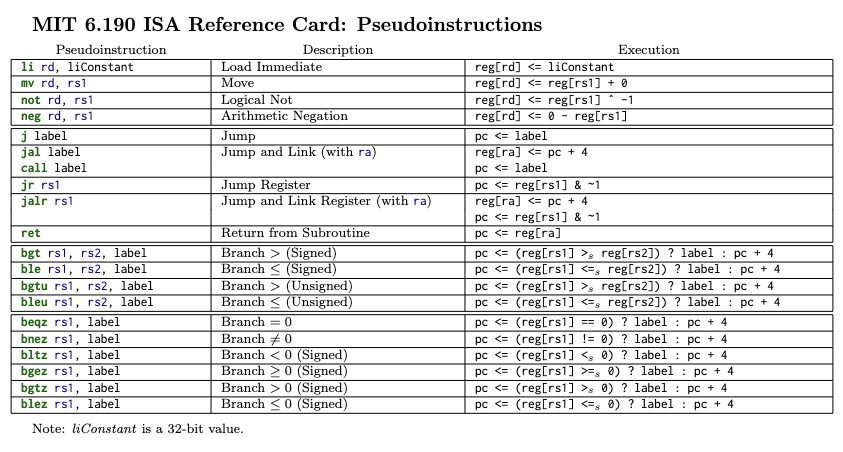
Pseudoinstructions
Pseudoinstructions are converted to actual RISC-V instructions.
| Pseudoinstruction | Equivalent assembly instruction |
|---|---|
mv x2, x1 | addi x2, x1, 0 |
ble x1, x2, label | bge x2, x1, label |
j label | jal x0, label |
li x2, 3 | addi x2, x0, 3 |
li x3, 0x4321 | lui x3, 0x4, addi x3, x3, 0x321 |
- 📍 ^
lipseudoinstruction translates into either one or two instructions depending on size of constant
Data memory vs. instruction memory
- Instructions & data are stored as 32-bit binary values in memory
- Data lives in one part of the memory, the program (instructions) live in another part of the memory
- 🔑 Instruction memory is usually write-protected (to avoid changing program during run-time)
lwandswoperations access data memory only (not program memory!)
Review: Program counter
The program counter (pc) register keeps track of the address of your next instruction.
- Default (non control-flow instructions):
pc = pc + 4+4because each instruction is 32-bits = 4 bytes, and memory is byte-addressed! So move down 4 bytes in memory to get to the next instruction.
- Control flow instructions might update
pcby a different amount
. = 0x0 # this indicates that the immediately following instruction is at address 0x0
	blt x1, x2, label
	addi x1, x1, 1
label:
	lw x3, 0x100(x0)

. = 0x100
	.word 0x12345678 # at address 0x100, we have this data word 0x123...
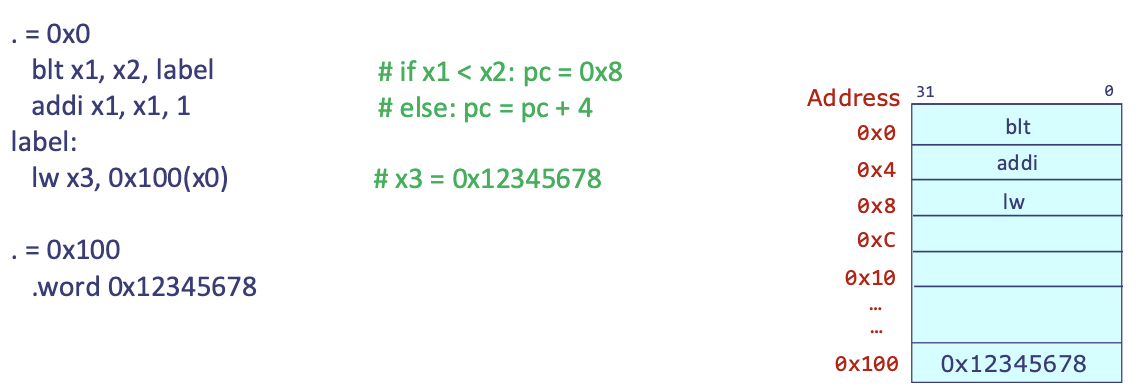
- ❓ If we do a jump to label, what address is label representing?
0x8(becausepcwas initially 0 → so offset between0x0and0x8is0x8)! So if the condition is met, we setpc = 0x8for the jump
- How does
lwwork?lw x3, 0x100(x0)means that we load value from memory location0x100+0 = 0x100→ so this instruction essentially setsx3 = 0x12345678
Compiling conditional statements
Compiling
if-elsestatements in assembly!
- C code:
if (expr) {
	if-code;
} else {
	else-code;
}
- Let's start with an example (part of GCD code):
if (x > y) {
	x = x - y;
} else {
	y = y - x;
}
- We'll use
x10forxandx11fory(registers)
	slt x12, x11, x10 # 1 if reg[x11] < reg[x10], 0 otw
	beq x12, x0, else

	# fall through to if-code
	sub x10, x10, x11 # x = x - y
	j endif # unconditional jump to the end

else: # reg[x10] >= reg[x11]
	sub x11, x11, x10

endif:
- 💡 General recipe for compiling
if-elsestatements in assembly:- Compile
exprinto registerxN - Conditional branch instruction that will jump to
elsewhenexpris 0 - Compile
if-codeinto assembly - Add unconditional jump past
elsebranch - Compile
else-codeinto assembly
- Compile
- ⚠️ But the above recipe required storing
exprresult into some register before jumping - can we skip this step?- Can also do:
	ble x10, x11, else
	sub x10, x10, x11
	j endif
else: sub x11, x11, x10
endif:
- 🔑 Alternative recipe ^: [this is the one you should use!
- Conditional branch instruction that will jump when the opposite of
expris true - Compile
if-codeinto assembly - Add unconditional jump past
elsebranch - Compile
else-codeinto assembly
- Conditional branch instruction that will jump when the opposite of
Compiling loops
while (expr) {
	loop-code
}
- 🔑 Recipe 1:
- Conditional branch instruction that will jump past loop body when opposite of
expris true - Compile
loop-codeinto assembly - Add unconditional jump to top of loop at end of
loop-code
- Conditional branch instruction that will jump past loop body when opposite of
- Example:
while (x != y) {
	if (x > y) {
		x = x - y;
	} else {
		y = y - x;
	}
}
loop:
	beq x10, x11, endloop
	# loop content
	ble x10, x11, else
	sub x10, x10, x11
	j endif
else: sub x11, x11, x10
endif:
	# unconditional jump to top of loop
	j loop
endloop:
- ⚠️ Notice that for Recipe 1 of writing while loops, we have two conditionals (branch)! Control flow instructions are actually the most expensive ones. Can we make it cheaper?
- 🔑 (Compiling loops...another way!) Recipe 2:
- Compile
loop-codeinto assembly - Put a conditional branch instruction after
loop_codethat jumps to the top of loop whenexpris true - Before starting loop, jump to that conditional branch instruction
- Compile
j compare
loop:
	ble x10, x11, else
	sub x10, x10, x11
	j endif
else: sub x11, x11, x10
endif:
compare:
	bne x10, x11, loop
- 💡 ^ now we only have a single control flow instruction (
ble) repeated inside the loop!
Procedures
What if we wanted to write a
gcdfunction that we could use throughout a program?
- 🔑 Encapsulate code into a procedure!
int gcd(int a, int b) {
	int x = a;
	int y = b;
	while (x != y) {
		if (x > y) {
			x = x - y;
		} else {
			y = y - x;
		}
	}
	return x;
}
Introduction to procedures
A procedure (aka. function, subroutine) is a reusable code fragment that performs a specific task. It has the following key components:
- Single named entry point
- Zero or more formal arguments
- Local storage
- Returns to the caller when finished
- ❓ Why use procedures? Because they enable abstraction and reuse!
- Compose large programs from collections of simple procedures
- 🔑 2 players: caller & callee
- When one procedure is called by another, a relationship is created between two procedures:
- Caller: the procedure that was called by the other procedure
- Callee: the procedure that was called by the caller
- When one procedure is called by another, a relationship is created between two procedures:
int coprimes(int a, int b) {
	return gcd(a, b) == 1;
}
void app_main() {
	int a = 5;
	int b = 10;
	int x = coprimes(a, b);
	...
}
- ^
gcd(a, b):coprimesis the caller,gcdis the callee coprimes(a, b):app_mainis the caller,coprimesis the callee
A procedure can be both a caller and a callee! Depends on which procedure call we're talking about.
- ❓ Procedures introduce many questions:
- How to transfer control to callee and back to caller?
- How to communicate arguments and return values?
- How to let procedures use more storage than can fit in registers?
- What if the caller and callee need to use the same register?
How to transfer control to callee and back to caller?
- Hypothesis: Callee could use an unconditional jump construction to get to the callee procedure...
- ⚠️ But the callee could be called from multiple places in a program!
- ❓ So how would the callee know where to return to?
- 💡 Fix: Return address!
Return address (
ra): Registerx1(symbolic namera) is used to hold a procedure's return address. Once finished with a procedure, the callee will userato jump back to the correct instruction within the caller procedure.
- ❓ How do we use
rato get back to the correct spot in the caller? Jump and link!
Jump and link
jal: unconditional jump and link- Format:
jal rd, label - Jump to instruction at
labelpcregister updates to be address of that instruction
- Link: stored in register
rd- The link is the address of the instruction after the
jalinstruction (rd = pc + 4prior to updatingpc) - 🔑 This is how we remember where we came from!
- The link is the address of the instruction after the
- Format:
jal x1, label # jump to instruction following label
addi x7, x7, 1 # x1 holds address of addi instruction
- Example:
jal ra, sum- When calling a procedure, we store the link in
ra
- When calling a procedure, we store the link in
proc:
	...
[0x100] jal ra, sum # ra = 0x104
	...
[0x678] jal ra, sum # ra = 0x67C
- ^ Equivalent pseudoinstructions:
jal sum,call sum - 💡 CPU transfers "control" to callee by moving the
pcto the address of the callee's instructions - ❓ How can the callee use
rato return back to the caller?
Jump and link register
jalr: unconditional jump via register and link- Format:
jalr rd, offset(rs1) - Jump to instruction stored at address
Reg[rs1] + offsetpcupdates to be address of that ^ instruction
- Link: stored in register
rd- The link is the address of the instruction after the
jalrinstruction (rd = pc + 4prior to updatingpc) - 🔑 Again, this is how we remember where we came from pre-jump!
- The link is the address of the instruction after the
- Format:
- 💡 How to transfer control back to the caller? Use
jalr x0, 0(ra)!raindicates where the program should return to- ⚠️ This works as long as
sumwas called usingjal ra, sumor equivalent, andrahasn't been overwritten since!!
- ⚠️ This works as long as
- Store link in
x0→ effectively discards it! We have no need to remember that we came from the end of a procedure.
proc:
	...
[0x100] jal ra, sum # ra = 0x104
	...
[0x678] jal ra, sum # ra = 0x67C
# ----
sum:
	...
	jalr x0, 0(ra)
- Equivalent pseudoinstructions to
jalr x0, 0(ra):jr ra,ret
Summary
- To call a procedure:
jal ra, label- Equivalent pseudoinstructions:
jal labelcall label
- ⚠️ These all assume by default that you're storing the link in the
raregister
- Equivalent pseudoinstructions:
- To return from a procedure:
jalr x0, 0(ra)- Equivalent pseudoinstructions:
jr raret
- ⚠️ Again assume by default that return value is stored in memory at address
ra& that we throw out the link (i.e., setx0to it) because we have no need to remember the position at the end of a procedure.
- Equivalent pseudoinstructions:
How to communicate arguments and return values?
- ❓ How does the callee know which register to look for a specific argument in, and how does the caller know which registers contain the return value?
- We need some rules!
A calling convention specifies rules for register usage across procedures.
- RISC-V calling convention gives symbolic names to registers
x0-x31to denote their role.- Certain registers are specified to hold function arguments and return values
| Symbolic name | Registers | Description |
|---|---|---|
a0 to a7 | x10 to x17 | Function arguments |
a0 to a1 | x10 to x11 | Function return values |
RISC-V Function Arguments
- 📍 Registers
a0-a7(x10-x17) are used as function arguments- First argument goes in
a0, second ina1, ... - If a function has more than 8 arguments, the extra ones will be passed via memory - more on this later!
- First argument goes in
- ⚠️ The caller must put function arguments in the necessary registers before calling a procedure - this way the callee can find them!
int coprimes(int a, int b) {
	return gcd(a, b) == 1;
}
// coprimes responsible for making sure a0 = a, a1 = b *before* calling gcd
int gcd(int x, int y) {
	...
} // so that gcd can assume a0 = x, a1 = y
RISC-V Return Values
- 📍 Registers
a0-a1(x10-x11) are used as function return values- First return value goes in
a0, second ina1 - If a function has more than 2 return values, the extra ones will be returned via specific slots in memory - more on this later!
- First return value goes in
- ⚠️ The callee is responsible for putting return values in the necessary registers before returning
int gcd(int x, int y) {
	...
} // gcd responsible for putting val in a0 before returning
int coprimes(int a, int b) {
	return gcd(a, b) == 1;
} // so coprimes can assume gcd(a,b) will be in a0, ready to use
Responsibility enables assumptions: The callee and caller don't need to know the implementation details of each other - they can work together solely by following the shared set of rules defined by the calling convention.
How to let procedures use more storage than can fit in registers?
- Storage problems:
- Running out of registers: There are only 32 registers, and all procedures need to be able to use the same 32 registers - need to manage register usage across different procedures to share them!
- Registers dedicated to certain things: Only 8 registers dedicated to holding function arguments - what if a procedure has 9? Same for function return vals (except only 2 dedicated registers).
- 🔖 TL;DR solution: Use a special section of memory!
RISC-V Stack
- Section of memory
- Grows down from higher to lower addresses
spregister points to the top of the stack
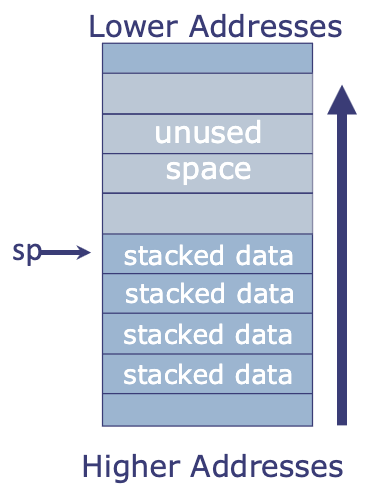
- 📍 2 operations:
pushandpop- Push: put something on top of stack
addi sp, sp, -4← allocate space for a 32-bit wordsw a1, 0(sp)← put element on
- Pop: take something off top of stack
lw a1, 0(sp)← take element offaddi sp, sp, 4← deallocate space
- Push: put something on top of stack
Using the stack
- A program must use the stack in a Last-In-First-Out (LIFO) manner
- The most recent thing added to the stack will be the next thing taken off
- ⚠️ Any procedure may use the stack, but it must leave the stack as it found it!
- Anything that goes on the stack must get taken off by the time the procedure returns.
spmust be reset to the value that it was at the beginning of the procedure.
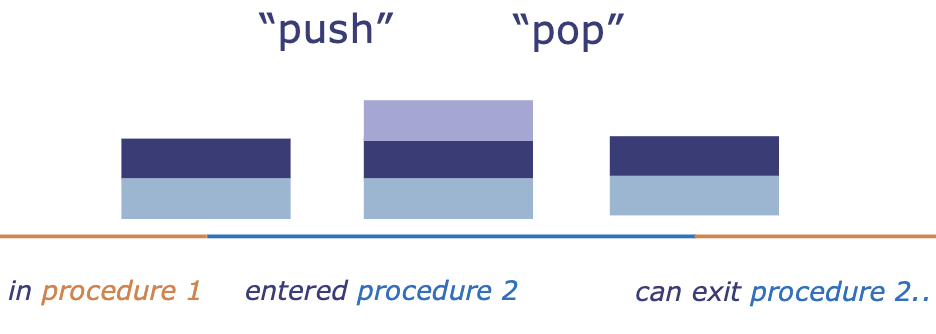
How to let a procedure use more memory than can fit in registers?
An activation record holds all storage needs of a procedure that do not fit in registers. The entire region of the stack that a particular procedure uses is its activation record.
- A new activation record is put on the stack when a new procedure is called (the program creates a new block of memory on the stack for this specific function call)
- That activation record is taken off the stack when that procedure returns
- its stack frame is removed (deallocate space)
- the stack pointer
spmoves back - control returns to
main
- 🔖 Activation records go on the stack LIFO: the current procedure's activation record (aka. stack frame) is always at the top of the stack
- 💡 Intuition: activation record of a procedure = all the local storage a procedure needs
- 📍 When you're inside a procedure, the stack pointer is always pointing to your procedure's activation record!
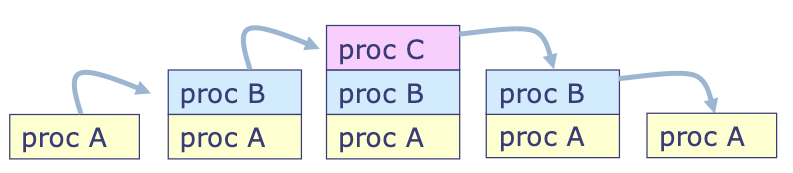
What if the caller and the callee need to use the same register?
RISC-V calling convention specifies rules for sharing registers among different procedures.
Calling convention
- If a register will (potentially) be overwritten across a function call, its value must be saved on the stack
- The caller procedure is responsible for saving some registers & the callee procedure is responsible for saving others.
- RISC-V ISA tells us which ones are which!
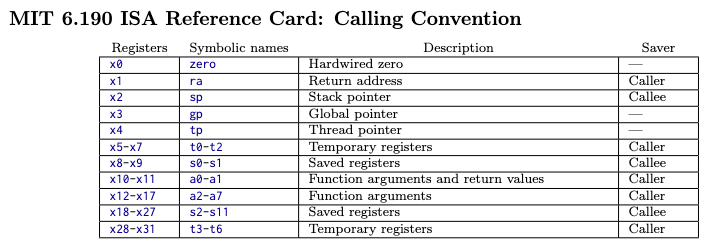
- RISC-V calling convention gives symbolic names to registers
x0-x31to denote their role:
| Symbolic name | Registers | Description | Saver |
|---|---|---|---|
a0 to a7 | x10 to x17 | Function arguments | Caller |
a0 and a1 | x10 and x11 | Function return values | Caller |
ra | x1 | Return address | Caller |
t0 to t6 | x5-7, x28-31 | Temporaries | Caller |
s0 to s11 | x8-9, x18-27 | Saved registers | Callee |
sp | x2 | Stack pointer | Callee |
gp | x3 | Global pointer | --- |
tp | x4 | Thread pointer | --- |
zero | x0 | Hardwired zero | --- |
| Reasoning behind why each of these registers are the responsibility of the caller vs. callee: |
- Temporaries are registers used for short-term scratch work during computation (intermediate calculations, loop counters, short-lived helper values, values that do not need to survive a function call)
- These are caller-saved because the callee is free to overwrite them - if the caller wants to keep them across a function call (i.e., caller does
xyzwork stored in temporary registers, then callsproc, then still wants values fromxyzwork), the caller must save them first.
- These are caller-saved because the callee is free to overwrite them - if the caller wants to keep them across a function call (i.e., caller does
- ^ vs: Saved registers are values that must survive procedure calls - if a caller stores a value in a saved register, it is expecting this value to be "long-lived" and to still be there after calling other procedures.
- So these are callee-saved!
gp, tp, zeroare special-purpose registers that follow fixed conventions, not normal save/restore rules- How to remember which registers are caller-saved vs. callee-saved:
- Caller-saved: procedure's attitude toward these registers = "I might destroy this, save it if you care"
- arguments, temporaries, return address
- Callee-saved: "I promise to give this back unchanged"
- saved registers, stack pointer
- Caller-saved: procedure's attitude toward these registers = "I might destroy this, save it if you care"
Caller-saved registers (aN, tN, ra)
- ⚠️ These registers are not preserved across a procedure call!
- The callee can use them freely → the caller doesn't know what registers the callee will use, so it must assume the callee will use all registers.
- For a caller to use a caller-saved register: If the caller needs a caller-saved register's value after the procedure call, it must:
- Before calling the procedure: save the register's value on the stack
- After returning from the procedure: restore the old value from the stack before next using the register
Any callee can use these registers freely because it can safely assume the caller will save any register values it will need.
Callee-saved registers (sN, sp*)
- 🔑 These registers are preserved across a procedure call!
- The caller can assume that the register's will be the same before and after the procedure call.
- For a callee to use a callee-saved register: If the callee wants to use a callee-saved register, it must:
- Before using: save the register's value on the stack
- After using: restore the old value from the stack before returning to the caller
- 🔖 The stack pointer
spdoesn't go on the stack ^, just needs to be reset to its original value.
Any caller can safely assume that these register values will be untouched because the callee will restore them to their original state before returning.
Summary
Caller:
- Saves any
aN,tN, orraregisters whose values need to be maintained past the procedure call on the stack prior to the procedure call - Restores them before using them again after returning from the callee
Callee:
- Saves original values of
sNregisters on the stack before using them in a procedure. - Must restore
sNregisters and stack pointer when done using them, before exiting procedure.
Examples
- Example: Using callee-saved registers:
- Implement
fusings0ands1to store intermediate values: (s0ands1are saved registers that the caller expects to be long-lived!)
- Implement
int f(int x, int y) {
	return (x + 3) | (y + 0x123456);
}
- ^ Translate C to assembly:
f:
	addi sp, sp -8 # allocate 2 words (8 bytes) on stack
	sw s0, 0(sp)   # save s0
	sw s1, 4(sp)   # save s1
	addi s0, a0, 3
	li s1, 0x123456 # load immediate (pseudoinstruction)
	add s1, a1, s1
	or a0, s0, s1
	lw s0, 0(sp)   # restore s0
	lw s1, 4(sp)   # restore s1
	addi sp, sp 8  # deallocate 2 words from stack (restore sp)
	ret # pseudoinstruction for jalr x0, 0(ra)
- Core ideas ^:
a0= holds the return value- the caller knows to check
a0anda1for return values because of RISC-V calling convention - if more than 2 return values, we use pointers to memory!
- the caller knows to check
ra= holds the return address (where to go back with the program counter)- ^ this is saved when the procedure is called (by the caller):
jal ra, label
- ^ this is saved when the procedure is called (by the caller):
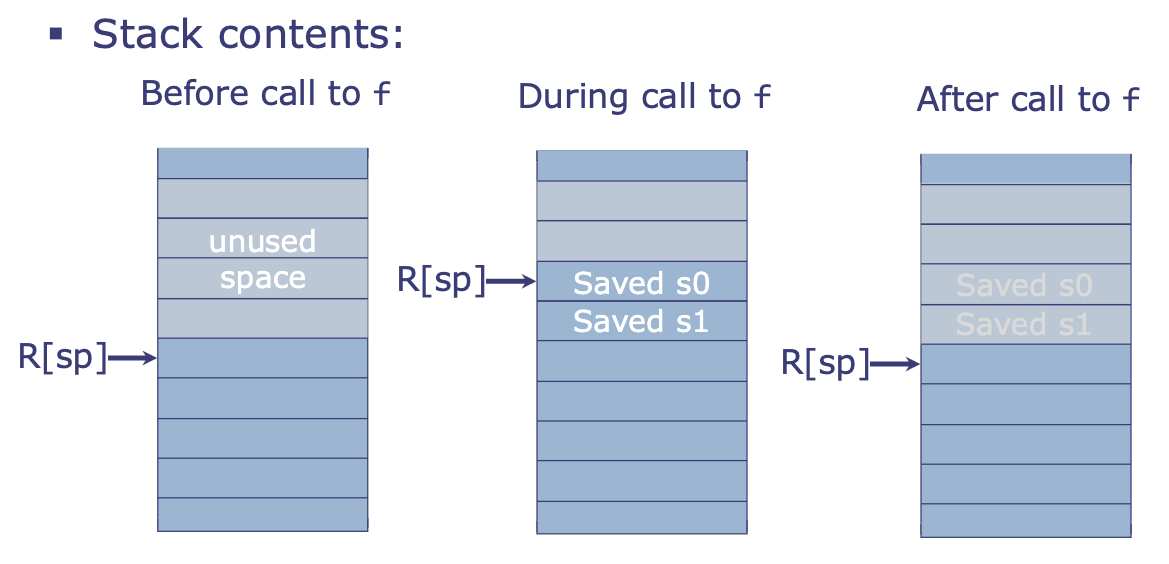
- Example: Using caller-saved registers
// caller
int x = 1;
int y = 2;
int z = sum(x, y);
int w = sum(z, y);

// callee
int sum(int a, int b) {
	return a + b;
}
- ^ Translating C to assembly:
li a0, 1
li a1, 2
addi sp, sp -8 # allocate stack frame
sw ra, 0(sp) # why??
sw a1, 4(sp) # save y
jal ra, sum  # a0 = sum(x,y) = z
lw a1, 4(sp) # restore y
jal ra, sum  # a0 = sum(x,y) = w
lw ra, 0(sp) # why??
addi sp, sp, 8 # deallocate stack
- ❓ Some questions:
- Why did we save
a1?- Callee may have modified
a1(caller doesn’t see implementation ofsum!)
- Callee may have modified
- Why didn't we save
a0?- We don't need the original value (
x) after either procedure call.
- We don't need the original value (
- Why did we save
ra?- This code is probably also inside some larger procedure! So its
rastarts out containingwhere this procedure should return after it finishes. - But then this procedure calls
sum, which overwritesrawith the address thatsumshould return to in this procedure. - So we save
rabefore callingsumand then restore after thesumcalls are done → this way, this procedure can later doretand correctly return to its caller
- This code is probably also inside some larger procedure! So its
- Why did we save
Nested procedures
- ⚠️ If a procedure calls another procedure, it needs to save its own return address
- Remember that
rais caller-saved
- Remember that
- Example:
int coprimes(int a, int b) {
	return gcd(a, b) == 1;
}
- Corresponding assembly code ^:
coprimes:
	addi sp, sp, -4
	sw ra, 0(sp) # save my own return address (set by code that called coprimes)
	call gcd # overwrites ra! pseudoinstruction = jal ra, gcd
	addi a0, a0, -1 # gcd result - 1
	sltiu a0, a0, 1 # check unsigned less than 1 (only sets 1 if a0=0)
	lw ra, 0(sp)
	addi sp, sp, 4
	ret # program will return to the ra address set by code that called coprimes
Computing with large data structures
- How do we pass large data structures (e.g. array) into procedures when the data struct is too large to be stored in registers?
- 💡 Pass the base address (pointer to array) and the size of the array as arguments
- Example: code to find the maximum element in an array with size elements
int main() {
	int ages[5] = {23, 4, 6, 81, 16};
	int max = maximum(ages, 5);
}
- ^ In assembly:
main:
	li a0, ages
	li a1, 5

ages:
	.word 0x17 # at address 0(ages), we have 32-bit word 0x17
	.word 0x4  # at address 4(ages), we have 32-bit word 0x4
	.word 0x6
	.word 0x51
	.word 0x10
- C code for finding max of array:
int maximum(int *a, size) {
	int max = 0;
	for (int i = 0; i < size; i++) {
		if (a[i] > max) {
			max = a[i];
		}
	}
	return max;
}
- ^ Assembly translation:
maximum:
	mv t0, zero # t0: i
	mv t1, zero # t1: max
	j compare
loop:
	slli t2, t0, 2 # t2: i*4
	add t3, a0, t2
	# t3: addr of a[i]=base+i*4
	lw t4, 0(t3) # t4: a[i]
	ble t4, t1, endif
	mv t1, t4 # max = a[i]
endif:
	addi t0, t0, 1 # i++
compare:
	blt t0, a1, loop
	mv a0, t1 # a0 = max (prepare to return)
	ret
Next lecture: Dynamic memory allocation!
Lab 5: Game of Life
- 3 rules of GOL:
- Any live cell with 2 or 3 live neighbors survives
- Any dead cell with 3 live neighbors becomes alive
- All other live cells die in the next generation, and all other dead cells stay dead.
- 🔖 Today: Write
updateBoardin assembly! updateBoardin C:
void updateBoard(uint32_t *current_board, uint32_t *new_board) {
	eraseBuffer(new_board); // clear board buffer

	// for each cell in the board
	for (int y = 0; y < 8; y++) {
		for (int x = 0; x < 32; x++) {
			// tally cell (x,y)'s # of living neighbors
			int neighbor_tally = checkNeighbors(current_board, x, y);
			// get the cell's current life state
			int current_cell = getPixel(current_board, x, y);
			// if 3 neighbors...
			if (neighbor_tally == 3) {
				// cell (x,y) is alive in next time step
				setPixel(new_board, x, y, 1);
			} // if 2 neighbors and current cell is occupied...
			else if (current_cell && neighbor_tally == 2) {
				setPixel(new_board, x, y, 1); //stay alive
			}
			// else, do nothing (since we emptied all cells using eraseBuffer call)
		}
	}
}
- Available helpers:
eraseBuffer,getPixel
3.4) Registers and calling convention
ra: return addresssp: points to top of stackt0-t6: these registers can be used for whatever but may not persist after function callss0-s11: these registers can be used for whatever but must persist after function callsa0-a1: hold first two arguments of function call and return values (if needed)a2-a7: hold other arguments for function call (if needed)
Caller vs. callee
- Responsibilities of callee:
- make sure
sphas the same value when exiting the procedure as when it entered the procedure - every single
sregister must have the same value exiting the procedure as it did when it entered the procedure
- make sure
- Responsibilities of the caller:
a,tmay not be conserved after procedure call - caller need to save what it wants to saveraneeds to be saved by caller
Key notes
- Remember to deallocate stack space (restore stack pointer
spto original spot when procedure was called) at the end of every procedure!!
Postlab 5: Quicksort
int partition(int* p, int start, int end) {
	int x = p[end]; // select pivot
	int tmp, i = start - 1;
	for (int j = start; j < end; j++) {
		if (p[j] <= x) {
			i++;
			# swap
			tmp = p[i];
			p[i] = p[j];
			p[j] = tmp;
		}
	}
	# insert the pivot back into its spot
	# after above loop, i = last index at which p[i] <= p[x]
	# ^ so p[i+1] > p[x]
	tmp = p[i + 1];
	p[i + 1] = p[end];
	p[end] = tmp;
	return i + 1;
}
void quicksort(int* p, int start, int end) {
	if (start < end) {
		int q = partition(p, start, end);
		quicksort(p, start, q - 1); // quicksort before pivot
		quicksort(p, q + 1, end); // quicksort after pivot
	}
}
Exercise 5
Pseudoinstructions
- Pseudoinstruction → non-pseudo:
call function_name→jal ra, function_name
- Non-pseudo → pseudo:
sub a4, zero, a2→neg a4, a2
Calling convention
- What value is left in register
x3after execution of this code segment?addi x3, zero, 0xFF40xFFFFFFF4- 📍 ^ remember that assembly will sign extend!!
Calling convention 2
f:
	# (1)
	mv a2, a1
	mv s0, a1
	li a1, 2
	# (2)
	call mul
	# (3)
	add a0, a0, a2
	add a0, a0, s0
	# (4)
	ret
	# (5)
- At minimum, need to store to the stack 3 things (
ra,x,y)- Could store directly or store
s0and displaces0for this procedure
- Could store directly or store
Symbolic encoding
- ❓ What is the 32-bit binary encoding of the instruction
jal ra, labelwhere label is 10 instructions after the current instruction? 0b1101111rd=ra=x1→00001imm[31:12]= 10 instructions → offset of 40 bytes- 40 =
0b101000 - bit 0 is dropped because address instructions are always divisible by 2 (valid address always divisible by 4)
- 40 =
imm[20|10:1|11|19:12] in the instruction
but interpreted as:
imm[20|19:12|11|10:1|0]
imm[20|10:1|11|19:12] → 20 bits total total stored
   0000_0000_0000_0001_0100 | 0 (implicit 0)
21                          1
0000_0010_1000_0000_0000
- ^ combined:
0000_0101_0000_0000_0000_00001_1101111
- ❓ What is the 32-bit binary encoding of the instruction
lw s1, 4(sp)? 0b


0000011rd=s1=x9→9 = 0b1001→01001rs1=sp=x2→10→00010imm=4=0000_0000_0100- Combined:
0000_0000_0100_00010_010_01001_0000011
- ❓ What is the 32-bit binary encoding of the instruction
beq a2, t6, labelwhere label is 7 instructions after the current instruction? 0b

1100011rs1=a2=x12=01100rs2=t6=x31=11111imm= 7 instructions after = address is 7x4 bits offset: 28 =11100- Drops lowest 0: encode
0000_0000_1110
- Drops lowest 0: encode
- Combined:
000_0000_11111_01100_000_11100_1100011
- ❓ What is the 32-bit binary encoding of the instruction
sw t3, 8(a0)? 0b

0100011rs1=a0=x10=01010rs2 = t3=x28=11100imm=8=1000- (can see on sheet -
swdoes not drop lowest bit (bit 0 is in the instruction binary), immediate is stored) 0000_0000_0100
- (can see on sheet -
- Combined:
0000_000_11100_01010_010_01000_0100011
- ❓ What instruction does the 32-bit binary value
0b0000000_00101_01010_101_01000_0110011encode (using symbolic registers)?

- `rs2 = 00101 = x5 = t0`
- `rs1 = 01010 = x10 = a0`
- `rd = 01000 = x8 = s0`
- Combined: `srl s0, a0, t0`
Stack Detective
int fn(int x) {
	int lowbit = x & 1;
	int rest = x >> 1;
	if (x == 0) return 0;
	else return ???;
} // keep going until we hit a lowbit = 0
fn:
	addi sp, sp -12
	sw s0, 0(sp)
	sw s1, 4(sp)
	sw ra, 8(sp)
	andi s0, a0, 1 # x & 1
	srai s1, a0, 1 # x >> 1
yy:
	beqz a0, rtn # if a0 = 0, jump to rtn
	mv a0, s1 # a0 = x >> 1
	jal ra, fn # jump and link to ra = next line, go to fn
	add a0, a0, s0 # a0 = fn(rest) + lowbit
rtn:
	# restore stack
	lw s0, 0(sp)
	lw s1, 4(sp)
	lw ra, 8(sp)
	addi sp, sp, 12
	jr ra
jr ra= jump register:pc <= reg[rs1] & ~1- rounds address =
reg[rs1]to an even number (0s out the 1s bit), and then setspcto this address
- rounds address =
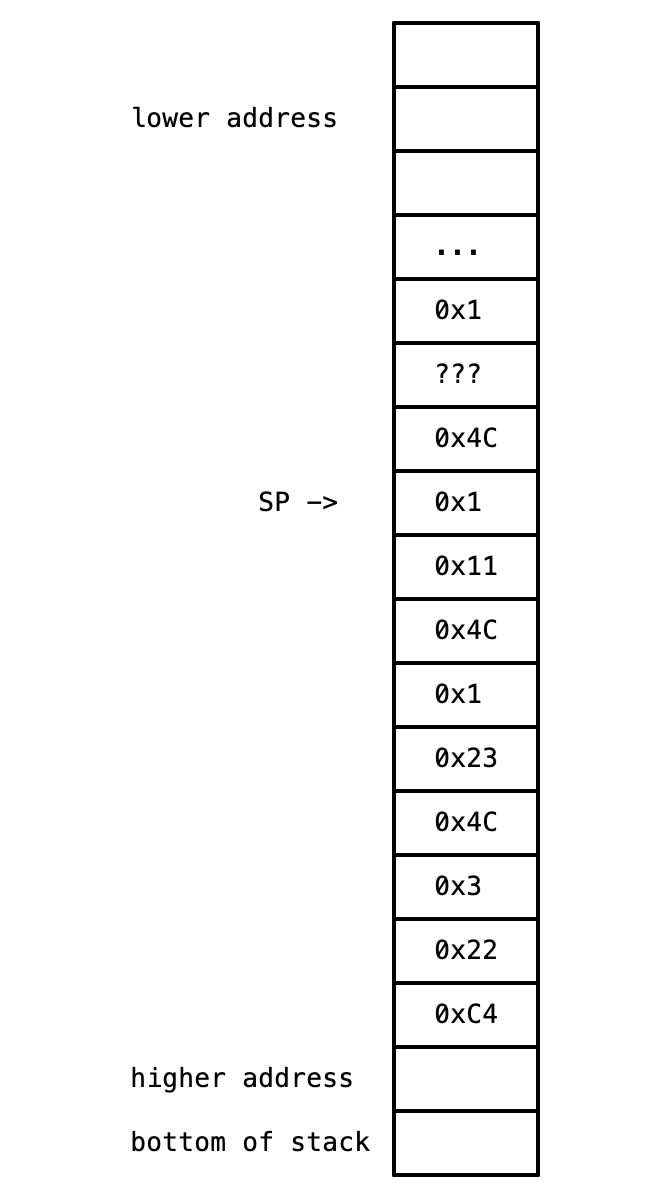
[first call]
s0 = 0x3
s1 = 0x22
ra = 0xC4

s0 = 0x1
s1 = 0x23
ra = 0x4C

s0 = 0x1 : lowbit
s1 = 0x11 : rest
ra = 0x4C

s0 = 0x1
s1 = ??? ← call to this function = (0x11 & 1) >> 1
ra = 0x4C
- ⚠️ WRONG WAY TO THINK ABOUT THIS (0x11 & 1) >> 1 :
00010001 & 1 = 00010001→00010001 >> 1 = 00001000=0x8
- What is the hex address of the instruction tagged
rtn:? 0x4C + 4 becausejal ra, fnstores the address ofadd a0, a0, s0to0x4C(8(sp)), andrtnis the next instruction after that (and instructions are stored with 4 byte offsets) - During procedure, stack pointer points at the lowest spot (bottom) of the stack for this procedure - i.e.
8(sp)is 8 + address ofspregister - Stack pointer marks the boundary between free / unallocated stack space and where active stack frames start:
lower addresses
free / unallocated stack space
-------------------------------
SP -> active stack frames start here
active stack frames
higher addresses
- What is the hex address of the
jalinstruction that calledfnoriginally? 0xrafirst recorded =0xC4→ sojalinstruction that calledfnmust have been0xC4 - 0x4(instruction before the one linked) =0xC0
- What hex value will be returned to the original caller if the value of
a0at the time of the original call was 0x47? 0x- This function is counting the number of ones -
0x47 = 01000111= 4
- This function is counting the number of ones -
Exercise 2
int get_remainder(int x, int y) {
	int difference = x - y;
	if (difference < 0) return x;
	else return get_remainder(x - y, y);
}
get_remainder:
	sub t0, a0, a1 # t0: x - y
	bltz t0, rtn # if t0 < 0, return x
	addi sp, sp, -4
	sw ra, 0(sp)
	mv a0, t0 # a0 = x - y
	jal get_remainder # call fn on x - y
	lw ra, 0(sp)
	addi sp, sp, 4
rtn:
	jr ra # jump register: jr ra = jalr x0, 0(ra)
- The execution of the procedure call
get_remainder(0x68, 0x20)has been suspended just as the processor is about to execute the instruction labeledrtn:during one of the recursive calls toget_remainder. A portion of the stack at the time execution was suspended is shown below:
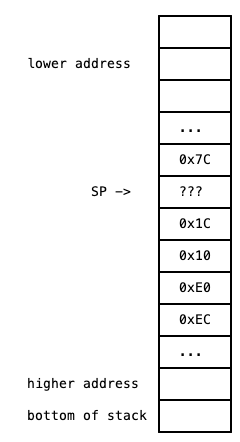
- For all of the following questions, suppose that during the initial (non-recursive) call to
get_remainder,sppointed to the memory location containing0x10. - ❓ What is the hexadecimal value of the
???in the stack dump that the stack pointer is pointing to? 0x- only
rais ever stored - so0x10→0x1C, we addedC→ nextra, we are adding same amount (since this is the same recursive function) →0x1C + 0xC = 0x28
- only
True Stack Detectives
arraySum:
     lw a2, 0(a0)
     li a3, 1
     beq a1, a3, end
     addi sp, sp, -8
     sw ra, 0(sp)
     sw a2, 4(sp)
     addi a0, a0, 4
     #REPLACE <---
     jal arraySum
     lw a2, 4(sp)
     add a2, a2, a0
     lw ra, 0(sp)
     addi sp, sp, 8
end:
mv a0, a2
ret
jal arraySumwill jump to labelarraySumand writera = addr of next instruction(in this caselw a2, 4(sp))
Exercises to review / general concepts to remember
- True Stack Detectives
- 📍 In binary, bit 0 is the rightmost / least significant bit (remember this when reviewing the indices of ISA instruction → binary)
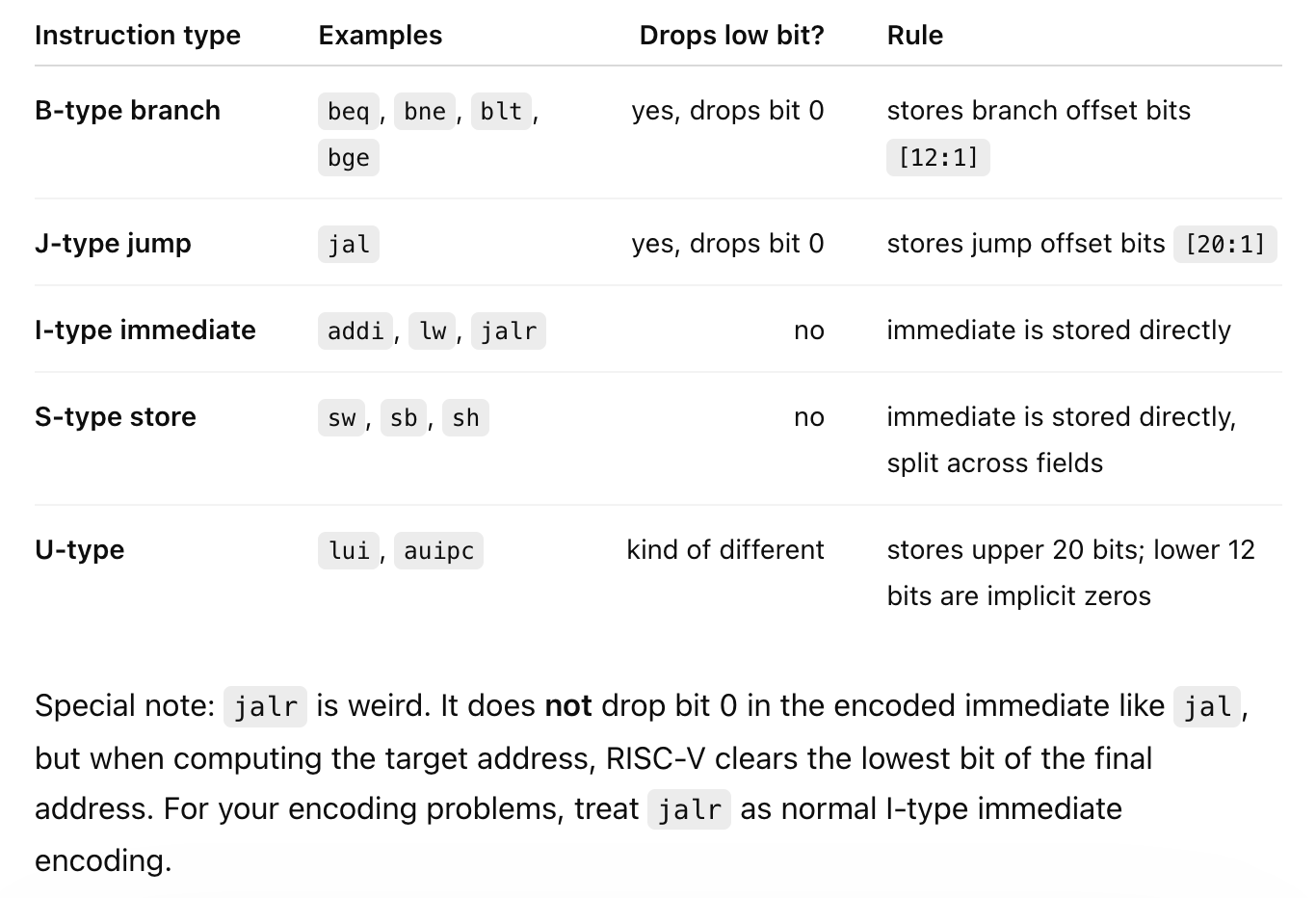
- ⚠️ In a downward-growing stack, lower memory addresses are more recent/deeper calls, and higher memory addresses are older caller frames (because we subtract from
speach time we add new things)
older calls     = higher addresses
newer calls     = lower addresses
current top     = current sp
push/allocate   = sp decreases
pop/free        = sp increases
Lecture 6
- Memory is a large chunk of storage that stores stuff
- word = 32 bits
- registers: bigger (take up more real estate on cpu) than memory, but can be immediately accessed
- memory might run fast or might run slower - depends where in memory you're trying to access
- DRAM - crazy high densities
- the individual bits in a DRAM are so tiny!!!
- very small capacitance - this is so tiny that they leak from material imperfections and can't hold their binary value for more than ~100ms at room temperature
- every bit of the billions stored in DRAM is periodically read and rewritten about every 64 ms on average at room temperature - a "refresh"
- instructions and stack are different regions of memory
- usually instructions have priority over data (in terms of access priority)
- heap - changes at runtime
- "data" (global and static variables) are separate from stack in memory space
- stack grows from higher addresses to lower addresses
- variable-length arrays are dangerous - risk too much stack growth
- at run-time your stack goes too far you'll get a stack overflow
- even worse is to have a stack overflow and not be aware of it
- often place "stack canaries"
- heap - variable length arrays
Pointers
- Pointers themselves are variables stored in memory. They are always of size 4 bytes (32 bits) so that they can point to any memory address on a 32-bit machine.
- Pointers point to the memory address of the lowest (least significant) base of a variable. e.g., if you have
uint32_t x = 80, then a pointer toxint *y = &xwould store the memory address of the least significant byte ofx- And then the fact that this pointer is an
uint32_tpointer will inform the compiler that starting from memory addressy, this byte atyand the next 3 bytes should be collectively dereferenced. - If this pointer was declared as an
uint8_tpointer, the compiler will only dereference the 1 byte at addressy
- And then the fact that this pointer is an
- 🔑 For a variable, its less significant bytes are stored in lower memory addresses.
- 🔑 Stack grows from higher addresses to lower addresses.